Transforming Thai PDFs: From Scanned Files to Editable Formats
Data Mastery Series — Extracting Text and Tables from Thai PDFs
Connect with me and follow our journey: Linkedin, Facebook
In many Thai companies, there’s a vast number of files saved in scanned PDF format. These files are often difficult to search through and take up a significant amount of time to process. Another common problem is the challenge of extracting data from these files, especially when dealing with tables or mixed content formats like text and images.
In this episode, I will not be discussing how to chat with PDF files using LLMs, as there is already a lot of content available on that topic 😊. Instead, I’ll focus on how to use LLMs to extract and convert the content from PDF files into more accessible formats like text files (txt) or document files (docx). For this test, I selected a variety of PDF file types that represent different real-world scenarios. My goal is to show how LLMs can save time and effort in converting and managing these files, especially for Thai-language documents.
1. Raw Files
For this experiment, I worked with 5 different types of PDF files. Although I loaded all the pages from each PDF, the focus is only on certain key areas:
- 1) Unclear Thai PDF file: A scanned document with plain Thai text but in an unclear quality.
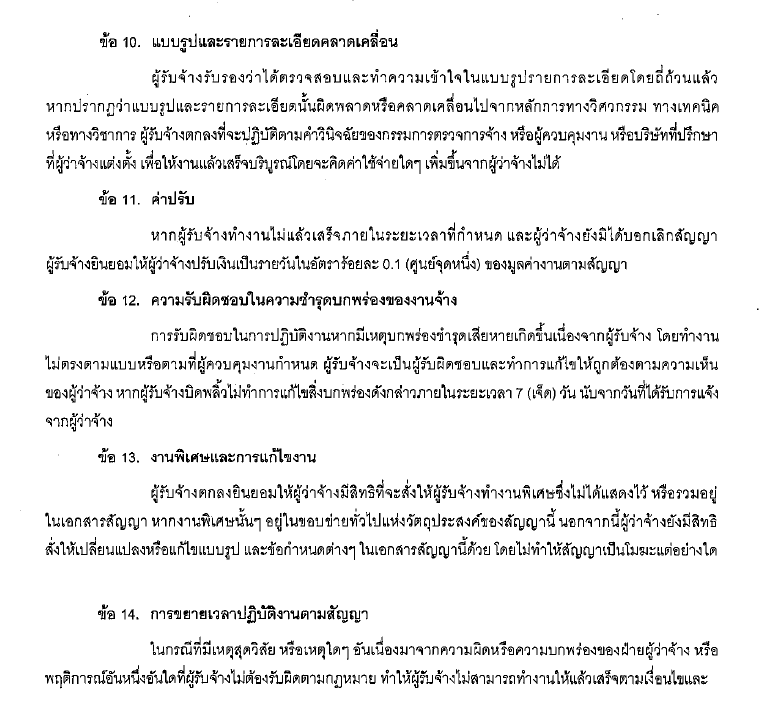
Figure: Unclear Thai PDF file
- 2) PDF file with a simple table: A digitally saved PDF with a simple table, where the text is clear but contains tabular data.
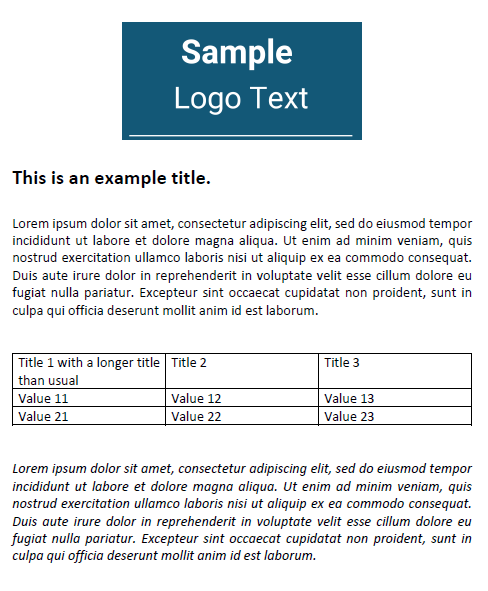
Figure: PDF file with a simple table
- 3) Unclear Thai PDF with a table split across pages: A scanned PDF with low quality, where a table is split across two pages.
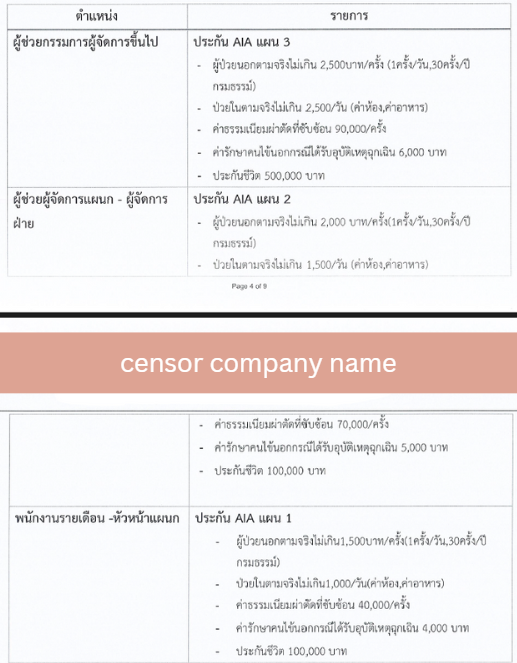
Figure: PDF file with a split table
- 4) Unclear English PDF with mixed formatting: A scanned English document containing various formats such as text, tables, and bullet points.
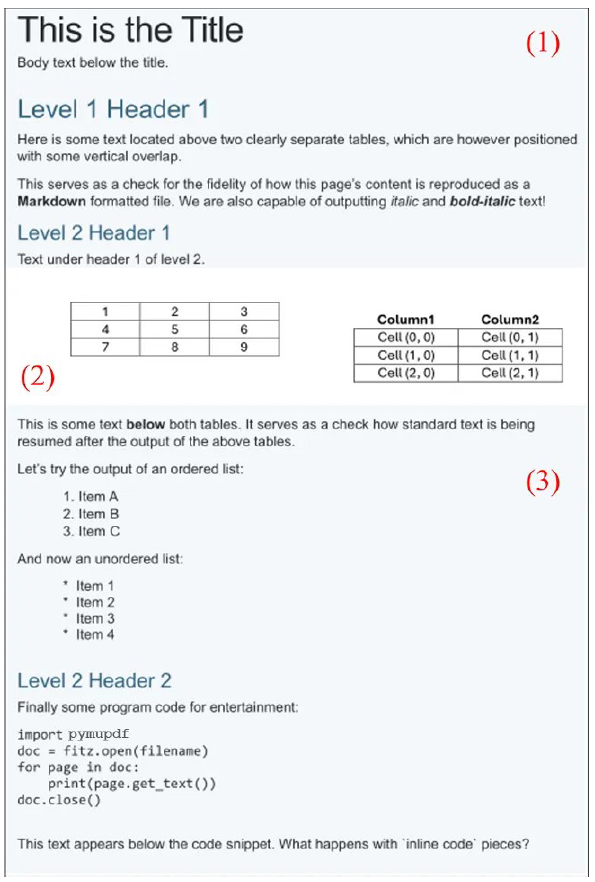
Figure: English PDF file with multiple formats
- 5) Unclear Thai PDF with a nested table: A scanned Thai document where a table is placed inside another table.
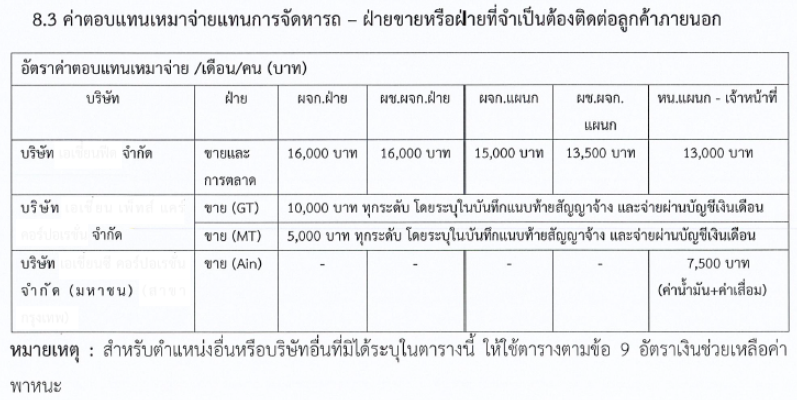
Test Results
Here are the best results I obtained from various techniques, keeping in mind that LLM outputs may vary with each run. In your case, the output might look slightly different.
- 1) Unclear Thai PDF file: The LLM was able to extract all the text from the scanned document into a text file with excellent accuracy.
Rating: The LLM’s capability to convert this type of file is 10/10
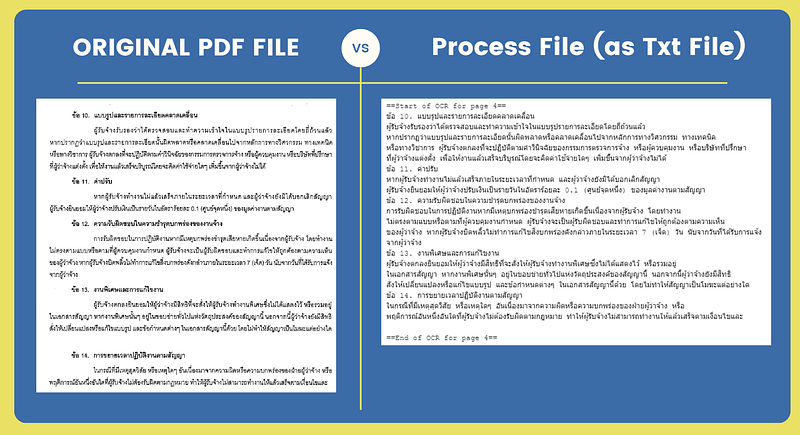
Figure: Unclear Thai PDF file converted to Txt file
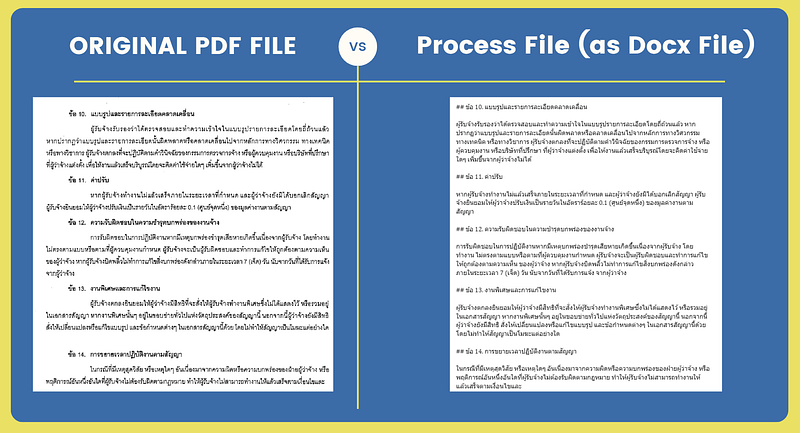
FFigure: Unclear Thai PDF file converted to Docx file
- 2) PDF file with a simple table: The LLM successfully converted the text and detected the table, using the
|symbol to represent the table’s structure in the text file.
Rating: Conversion accuracy is 10/10
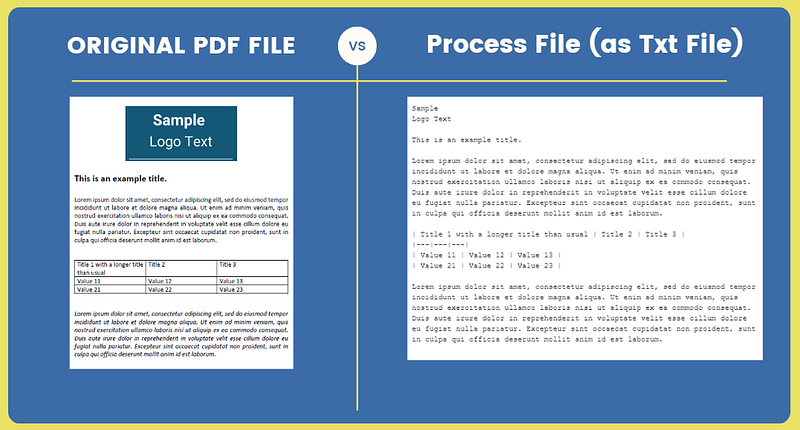
Figure: PDF file with a simple table to Txt File
Additionally, Python can be used to convert the text file into a docx file and format the table accordingly.
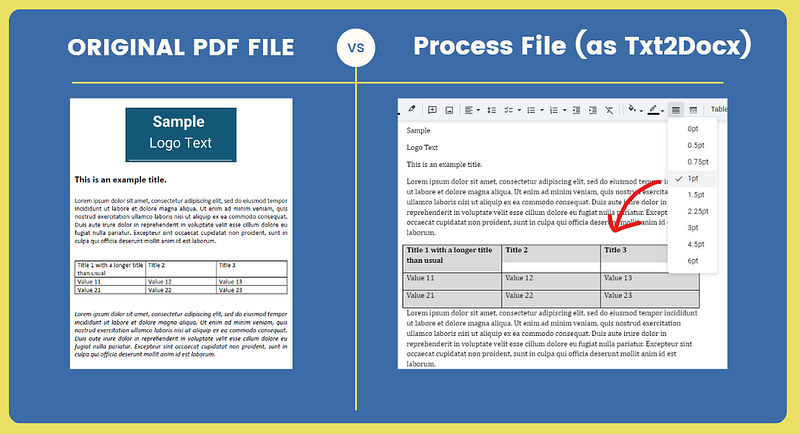
Figure: Python converts txt file to Docx with table formatting and manual border addition
- 3) Unclear Thai PDF file with a table split across pages: The LLM managed to capture the entire table, even though it was split across two pages.
Rating: I give this conversion a 10/10.
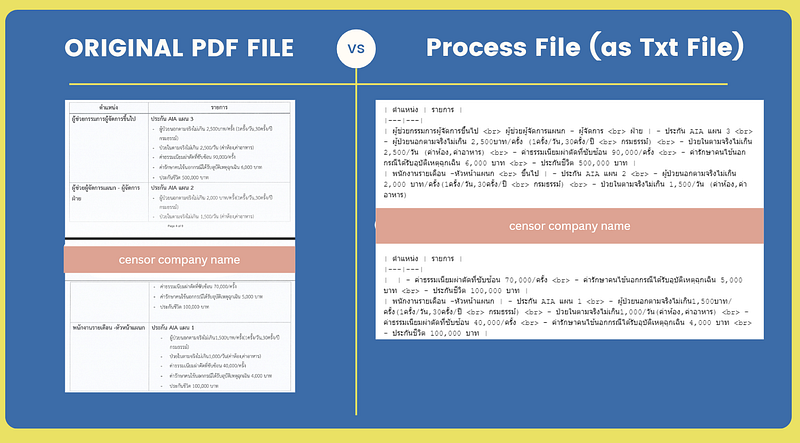
Figure: PDF file with a split table converted to Txt and Docx files
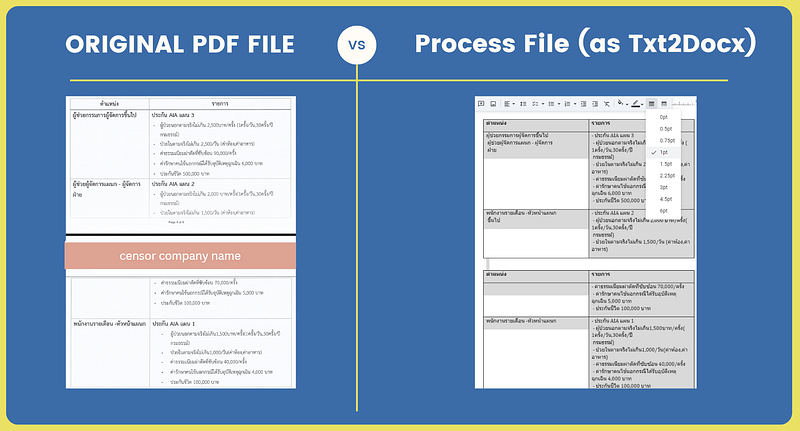
Figure: Python converts txt file to Docx with table formatting and manual border addition
- 4) Unclear English PDF file with mixed formatting: The LLM performed well with this file, capturing all tables, bullet points, and even Python code. However, when converting from text to docx, the tables became stacked instead of retaining their original format.
Rating: I rate this 9/10 due to minor table stacking issues.
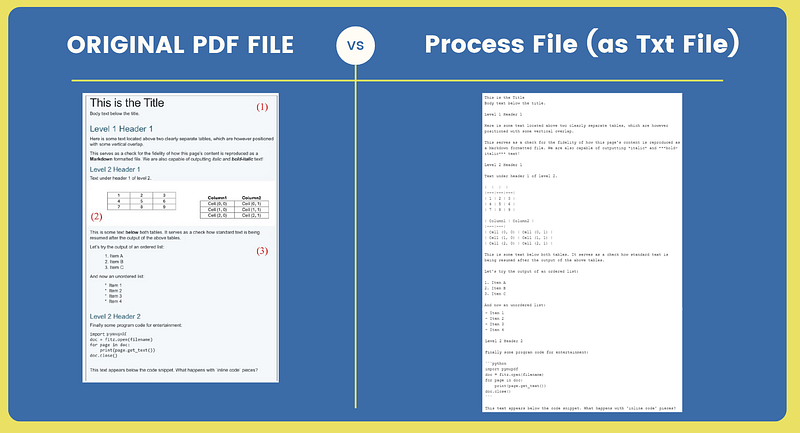
Figure: English PDF file with multiple formats converted to Txt file
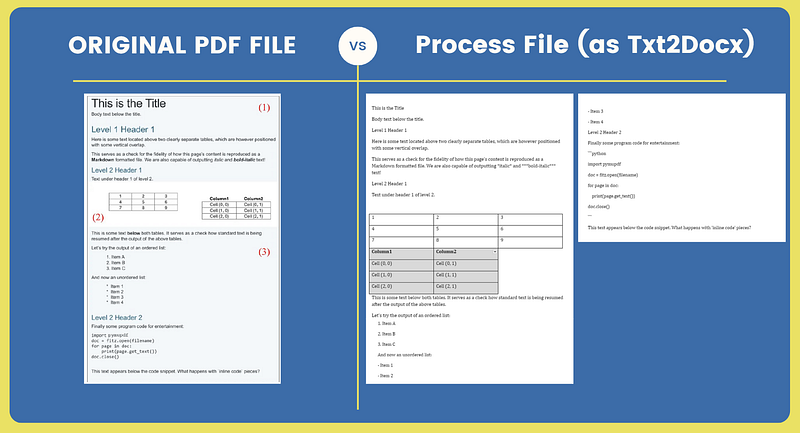
Figure: Python converts txt file to Docx with table formatting and manual border addition
- 5) Unclear Thai PDF with nested tables: While the LLM detected the presence of tables, the nested structure wasn’t fully accurate. This result serves as a preliminary draft, requiring manual adjustments to achieve the final output.
Rating: I’d give this conversion 7/10, as human intervention is needed
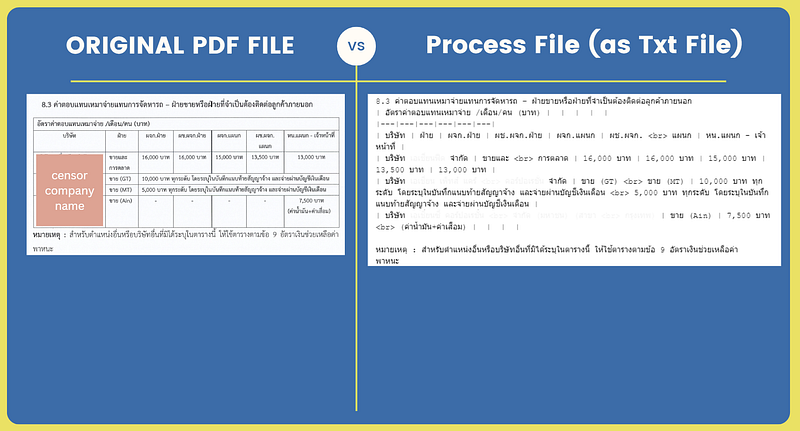
Figure: Nested tables converted to Txt file
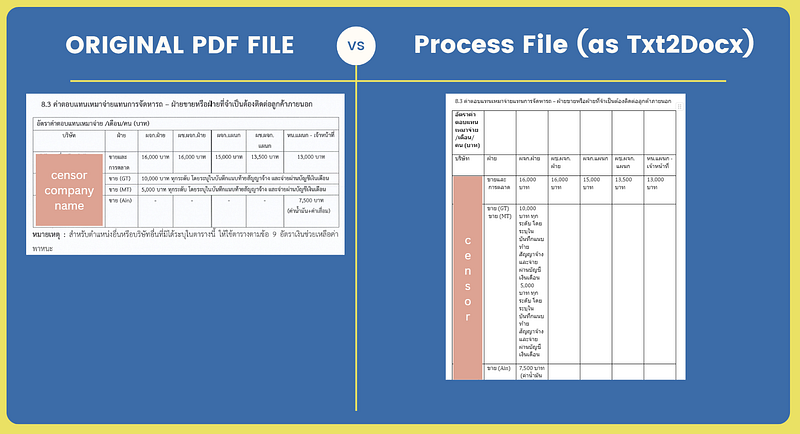
Figure: Python converts txt file to Docx with table formatting and manual border addition
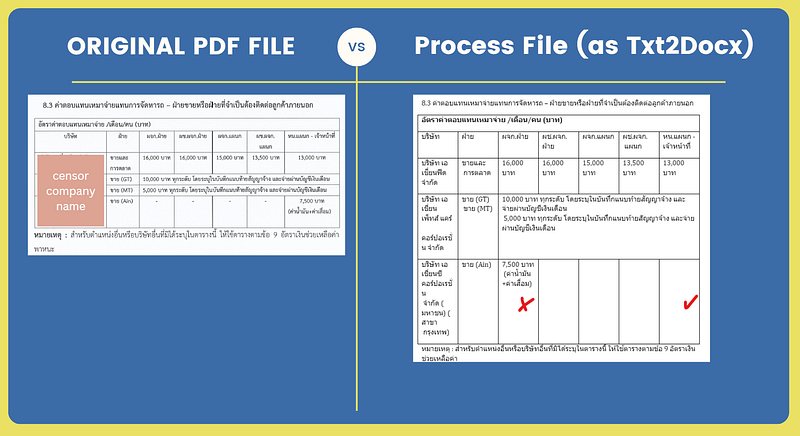
Figure: Manual merging of cells
Converting scanned Thai PDFs, especially those with mixed content like tables, can be challenging, but LLMs have proven to be a valuable tool in simplifying this task. From extracting text to handling tables, these models have demonstrated impressive capabilities. However, as with most AI-driven processes, some manual refinement may still be needed depending on the complexity of the document. I hope this case study can offer some useful insights for companies dealing with similar file conversion challenges.
Data Science Explore the world of data science with Donato_Story
Dashboard Discover the power of data visualization with Donato_Story
Donato_Journey Join me on my journey (Thai version)
Course_Review Discover the training courses with Donato_Story (Thai version)
I really value your thoughts and feedback. Please share any comments or questions below, or reach out to me on:
Medium: medium.com/donato-story
Facebook: web.facebook.com/DonatoStory
Linkedin: linkedin.com/in/nattapong-thanngam
Originally published on Medium
Related

A Practical Guide to Building Agents
คู่มือปฏิบัติ: การสร้าง Agent ด้วย LLM โดย OpenAI

AI in the Enterprise โดย OpenAI
ถอดรหัสเคล็ดลับองค์กรระดับโลก ปลดล็อกศักยภาพ AI สร้างความได้เปรียบทางธุรกิจ
Best Practices for Bar Charts
Visualization Series — Episode 2

Best Practices for Line Charts
Visualization Series — Episode 3