Plan-and-Execute ในโลกของ Planning Agents
Data Mastery Series — Episode 60: ออกแบบ Agent ที่ “วางแผน-ลงมือทำ-วางแผนใหม่” แบบอัตโนมัติด้วย LangGraph
📌 Connect with me and follow our journey: Linkedin, Facebook
ในซีรีส์ Data Mastery เราได้สำรวจศักยภาพของ LangGraph ผ่านหลายตอนที่ผ่านมา ไม่ว่าจะเป็น LangGraph Introduction, Agentic RAG, Adaptive RAG, Corrective RAG, Self RAG, SQL RAG, Prompt Template Agent, Network Multi-Agent Systems, Supervisor Multi-Agent Systems, และ Hierarchical Multi-Agent Systems
ใน EP.60 นี้ เราจะเจาะลึกแนวคิด “Plan-and-Execute Agent” — ระบบ AI ที่มีความสามารถในการ:
- วางแผนล่วงหน้า
- แบ่งงานออกเป็นขั้นตอนย่อย
- ลงมือทำทีละขั้น
- ประเมินผลและปรับแผนเมื่อจำเป็น
🧩 แนวคิดของ Plan-and-Execute Agent
แนวคิดนี้ได้รับแรงบันดาลใจจากงานวิจัย “Plan-and-Solve” และโครงการ BabyAGI โดยมีจุดเด่นเหนือกว่า ReAct Agent แบบดั้งเดิม ดังนี้:
- โครงสร้างชัดเจน — เหมาะกับโจทย์ที่ต้องทำหลายขั้นตอน
- ประสิทธิภาพสูง — ใช้ LLM ขนาดใหญ่เฉพาะตอนวางแผน ส่วนการลงมือทำสามารถใช้ LLM รุ่นเล็กได้
- ความยืดหยุ่น — สามารถปรับแผนได้แบบ Dynamic หากผลลัพธ์ยังไม่สมบูรณ์
✨ กรณีศึกษานี้อ้างอิงจากเอกสารทางการของ LangGraph ในหัวข้อ Planning Agents → Plan-and-Execute: Implement a basic planning and execution agent
🔄 การทำงานของ Plan-and-Execute Agent
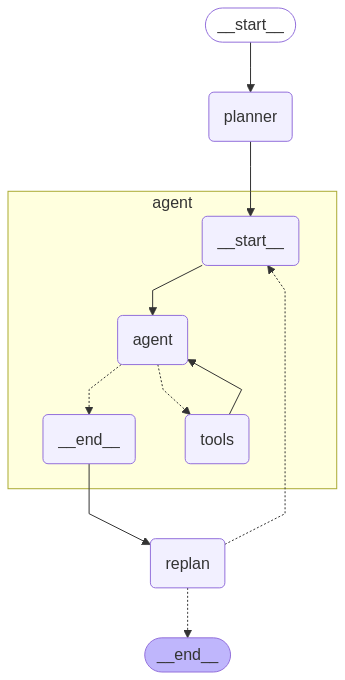
Figure: Plan-and-Execute Workflow
- 🧑💼 คำถามจากผู้ใช้:
What's the hometown of the mens 2024 Australia open winner?
📅 Step 1: planner — วางแผนการหาคำตอบ
async def plan_step(state: PlanExecute):
plan = await planner.ainvoke({"messages": [("user", state["input"])]})
return {"plan": plan.steps}
- หน้าที่: ใช้ LLM วางแผนแบบ step-by-step เพื่อค้นหาคำตอบอย่างมีระบบ
System Prompt ที่ใช้:
"""For the given objective, come up with a simple step-by-step plan.
This plan should involve individual tasks that, if executed correctly, will yield the correct answer.
Do not add unnecessary steps.
Ensure each step has all required information and leads to the final result."""
- Output: แผนการทำงาน 4 ขั้นตอน
ตรวจสอบผู้ชนะ→ค้นหา Profile→หาภูมิลำเนา→ตรวจสอบแหล่งข้อมูล
{'plan': [
"Check the official website or reliable sports news sources for the winner of the 2024 Australian Open men's singles.",
"Find the player's profile on the official ATP website or other reliable sports databases.",
"Look for the player's personal information section to find their hometown.",
"Verify the information from multiple sources to ensure accuracy."
]}
📅 Step 2: Agent — ลงมือทำตามแผนขั้นแรก
async def execute_step(state: PlanExecute):
task = plan[0]
task_formatted = f"You are tasked with executing step 1, {task}"
agent_response = await agent_executor.ainvoke(...)
return {"past_steps": [(task, agent_response["messages"][-1].content)]}
- หน้าที่: ดึง step แรกจากแผน แล้วให้ agent ใช้ LLM และ Tavily Tool ค้นหาคำตอบ
- Output: พบว่า Jannik Sinner เป็นผู้ชนะ พร้อมลิงก์อ้างอิงจากเว็บไซต์ทางการ
{'past_steps': [
("Check the official website or reliable sports news sources for the winner of the 2024 Australian Open men's singles.",
"The winner of the 2024 Australian Open men's singles is Jannik Sinner. He clinched the title by defeating Daniil Medvedev with scores of 3-6, 3-6, 6-4, 6-4, 6-3. This victory marks his first major singles title. For more details, you can visit the Australian Open official website.")]}
📅 Step 3: Replanner — ประเมินและปรับแผนใหม่
async def replan_step(state: PlanExecute):
output = await replanner.ainvoke(state)
if isinstance(output.action, Response):
return {"response": output.action.response}
else:
return {"plan": output.action.steps}
- หน้าที่:
- ตรวจสอบว่าข้อมูลเพียงพอหรือยัง
- หากยังไม่เพียงพอ → วางแผนใหม่เฉพาะคำถามที่ยังเหลืออยู่ - Output: วนไปตอบคำถามข้อที่ 2 →
ค้นหา Profile
{'past_steps': [(
"Find Jannik Sinner's profile on the official ATP website or other reliable sports databases.",
"I found Jannik Sinner's profile on the official ATP website. You can view his profile here. This page should contain comprehensive information about him, including his personal information section where you can find details such as his hometown.")]}
📅 Step 4 onward: วนลูปไปยัง “Agent” อีกครั้ง
- หน้าที่: เมื่อยังไม่ได้คำตอบที่ต้องการ จึงต้องวนเพื่อตอบคำถามข้อ 3
- Output:
หาภูมิลำเนาของ Jannik Sinner
{'past_steps': [(
"Look for Jannik Sinner's personal information section on the ATP website to find his hometown.",
"Jannik Sinner's hometown is San Candido, Italy. This information is found in the Britannica article dedicated to his biography and career details.")]}
📅 Step สุดท้าย: ตรวจสอบและสรุปผล
- หน้าที่: จากขั้นตอนที่ผ่านมา พบว่ามีข้อมูลเพียงพอแล้ว จึงตอบคำถามและจบการทำงาน
- Output:
{'response':
"The objective has been successfully completed. Jannik Sinner, the winner of the 2024 Australian Open men's singles, is from San Candido, Italy. No further steps are required."}
ระบบ Plan-and-Execute ช่วยให้เราสร้าง Agent ที่มีความสามารถแบบ Dynamic และยืดหยุ่นสูง:
- วางแผนล่วงหน้าได้ — ลดปัญหา LLM ตอบไม่ตรงประเด็น
- ปรับแผนได้เมื่อทำไม่สำเร็จ — เพิ่มความยืดหยุ่นในการแก้ปัญหา
- ตอบคำถามได้ละเอียดและแม่นยำขึ้น — เพิ่มความน่าเชื่อถือของระบบ
- ต่อยอดสู่การพัฒนาขั้นสูง — สามารถพัฒนาต่อยอดเป็น DAG-based execution, parallel agent, หรือ multi-modal agents ได้
📚 EP.61 — เราจะกล่าวถึง Planning Agents ในหัวข้อ Plan-and-Execute: Implement a basic planning and execution agent ฝากติดตามด้วยนะครับ ^__^
Data Science Explore the world of data science with Donato_Story
Dashboard Discover the power of data visualization with Donato_Story
Donato_Journey Join me on my journey (Thai version)
Course_Review Discover the training courses with Donato_Story (Thai version)
Let’s Connect!
Your thoughts and feedback are invaluable. Feel free to share them in the comments or connect with me on
- 🌐 Medium: medium.com/donato-story
- 📘Facebook: web.facebook.com/DonatoStory
- 💼 Linkedin: linkedin.com/in/nattapong-thanngam
Originally published on Medium
Related

Corrective RAG
Data Mastery Series — Episode 53: RAG ที่ “คิด” ก่อน “ตอบ” และ “แก้ไข” เมื่อผิดพลาด

Hierarchical Multi-Agent Systems
Data Mastery Series — Episode 59: การสร้างระบบ AI ทีมงานด้วย Supervisor Agent กับทีมย่อย
LangGraph Introduction
Data Mastery Series — Episode 50: Next-Level Chat with Document

LLM Note 2
Data Mastery Series — Episode 47: Summarization Techniques and Advanced RAG