Exploring LangGraph with LangChain
Data Mastery Series — Episode 44: LangChain Website (Part 19)
Connect with me and follow our journey: Linkedin, Facebook
Welcome back to the Data Mastery Series! If you’ve been following along, we’ve built a robust foundation, progressing from LangChain basics to advanced implementations. Here’s a quick recap of our journey so far:
- Part 1: LangChain Model I/O Basics
- Part 2–3: Prompt Templates and Few-Shot Prompts
- Part 4–6: Deep Dive into Chat Models (Part 1, Part 2, Part 3)
- Part 7: LLM Fundamentals
- Part 8: Output Parsers
- Part 9: Document Loaders
- Part 10: Text Splitter
- Part 11: Embeddings and Vector Stores
- Part 12–14: Retrievers (Part 1, Part 2, Part3)
- Part 15–16: Agent (Part 1, Part 2)
- Part 17: Tools and Chain
- Part 18: LangGraph (Part 1)
Note:This post is inspired by insights from the official LangChain documentation and represents my practical learning journey.
Today, we’re taking our exploration of LangGraph even further! We’re going to build a smarter chatbot, one that can not only answer questions but also remember past conversations, get help from a human when needed, and even go back in time to fix mistakes. Let’s jump in! 🚀
LangGraph Quick Start
We’ll start with a simple bot and make it more advanced step by step.
Part 1: Build a Basic Chatbot
LangGraph introduces a state machine approach to chatbot development. The key elements are:
- State: Defines the chatbot’s structure, including schemas and state updates.
- Nodes: Represent units of work, typically Python functions.
- Edges: Specify transitions between nodes.
Example - Part 1: Basic Chatbot
Define the state schema
class State(TypedDict):
messages: Annotated[list, add_messages]
Initialize the graph builder
graph_builder = StateGraph(State)
Add a Chatbot Node
llm = ChatOpenAI(model="gpt-3.5-turbo", temperature=0, api_key=OPENAI_API_KEY)
def chatbot(state: State):
return {"messages": [llm.invoke(state["messages"])]}
Create the graph/workflow
graph_builder.add_node("chatbot", chatbot)
graph_builder.add_edge(START, "chatbot")
graph_builder.add_edge("chatbot", END)
graph = graph_builder.compile()
Visualize the graph
try:
display(Image(graph.get_graph().draw_mermaid_png()))
except Exception:
pass
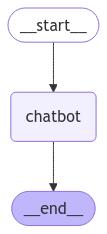
Figure: Simple chatbot workflow showing the flow from start to the chatbot and then end.
Example - Part 1: Basic Chatbot (Continued)
Run the Chatbot
def stream_graph_updates(user_input: str):
for event in graph.stream({"messages": [("user", user_input)]}):
for value in event.values():
print("Assistant:", value["messages"][-1].content)
while True:
user_input = input("User: ")
if user_input.lower() in ["quit", "exit", "q"]:
print("Goodbye!")
break
stream_graph_updates(user_input)
Output (Question: What do you know about LangGraph?)
'''
User: What do you know about LangGraph?
Assistant: LangGraph is a language learning platform that uses artificial intelligence and machine learning to help users improve their language skills. It offers personalized lessons and exercises based on the user's proficiency level and learning goals. LangGraph also provides feedback and recommendations to help users track their progress and improve their language skills effectively. The platform supports multiple languages and offers a variety of interactive activities to make learning engaging and fun.
User: q
Goodbye!
'''
🎉 Congratulations! You’ve built a basic chatbot. Next, we’ll enhance its capabilities by integrating tools for improved functionality.
Part 2: Enhancing the Chatbot with Tools
Our basic chatbot is functional but limited. Let’s enhance it with web search capabilities using the Tavily Search Engine.
Example - Part 2: Enhancing the Chatbot with Tools
Define the state schema
class State(TypedDict):
messages: Annotated[list, add_messages]
Initialize the graph builder
graph_builder = StateGraph(State)
Define the search tool (e.g., TavilySearchResults)
tool = TavilySearchResults(max_results=2, tavily_api_key = TavilyS_key)
tools = [tool]
tool_node = ToolNode(tools=tools)
llm = ChatOpenAI(model="gpt-3.5-turbo", temperature=0, api_key=OPENAI_API_KEY)
llm_with_tools = llm.bind_tools(tools)
Add a Chatbot Node
def chatbot(state: State):
return {"messages": [llm_with_tools.invoke(state["messages"])]}
Create Graph/Workflow
graph_builder.add_node("chatbot", chatbot)
graph_builder.add_node("tools", tool_node)
graph_builder.add_conditional_edges("chatbot",tools_condition)
graph_builder.add_edge(START, "chatbot")
graph_builder.add_edge("tools", "chatbot")
graph = graph_builder.compile()
Visualize
try:
display(Image(graph.get_graph().draw_mermaid_png()))
except Exception:
pass
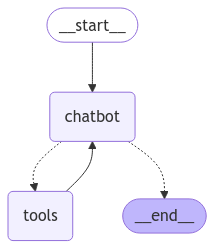
Figure: Enhanced chatbot workflow with tool integration, showing the flow between start, chatbot, and tools.
Example - Part 2: Enhancing the Chatbot with Tools (Continued)
Run the Chatbot with Tools
def stream_graph_updates(user_input: str):
# Send user input to the graph and process responses
for event in graph.stream({"messages": [("user", user_input)]}):
for value in event.values():
print("Assistant:", value["messages"][-1].content)
while True:
try:
print()
user_input = input("User: ")
if user_input.lower() in ["quit", "exit", "q"]:
print("Goodbye!")
break
stream_graph_updates(user_input)
except Exception as e:
print(f"Error: {e}")
break
Output (Question: What do you know about LangGraph?)
'''
User: What do you know about LangGraph?
Assistant:
Assistant: [{"url": "https://langchain-ai.github.io/langgraph/", "content": "Overview¶ · LangGraph is a library for building stateful, multi-actor applications with LLMs, used to create agent and multi-agent workflows."}, {"url": "https://langchain-ai.github.io/langgraph/tutorials/introduction/", "content": "LangGraph is a library for building stateful, multi-actor applications with LLMs, used to create agent and multi-agent workflows. Compared to other LLM"}]
Assistant: LangGraph is a library for building stateful, multi-actor applications with LLMs (Large Language Models). It is used to create agent and multi-agent workflows. You can find more information about LangGraph on their official website: LangGraph Official Website
User: q
Goodbye!
'''
Now, you’ll see that the chatbot can search the web for information to give you better answers!
Part 3: Adding Memory to the Chatbot
Memory enables the chatbot to maintain context, supporting more natural, multi-turn conversations.
Example - Part 3: Adding Memory to the Chatbot
Define the state schema
class State(TypedDict):
messages: Annotated[list, add_messages]
Initialize MemorySaver for checkpointing
memory = MemorySaver()
Initialize the graph builder
graph_builder = StateGraph(State)
Define the search tool (e.g., TavilySearchResults)
tool = TavilySearchResults(max_results=2, tavily_api_key = TavilyS_key)
tools = [tool]
tool_node = ToolNode(tools=tools)
llm = ChatOpenAI(model="gpt-3.5-turbo", temperature=0, api_key=OPENAI_API_KEY)
llm_with_tools = llm.bind_tools(tools)
Add a Chatbot Node
def chatbot(state: State):
return {"messages": [llm_with_tools.invoke(state["messages"])]}
Create Graph/Workflow
graph_builder.add_node("chatbot", chatbot)
graph_builder.add_node("tools", tool_node)
graph_builder.add_conditional_edges("chatbot",tools_condition)
graph_builder.add_edge(START, "chatbot")
graph_builder.add_edge("tools", "chatbot")
graph = graph_builder.compile(checkpointer=memory) # Adding Memory
Set configuration for the conversation thread
config = {"configurable": {"thread_id": "1"}}
Visualize
try:
display(Image(graph.get_graph().draw_mermaid_png()))
except Exception:
pass
Figure: Chatbot workflow with memory added, including the checkpointer.
Example - Part 3: Adding Memory to the Chatbot (Continued)
Run the Chatbot with Memory
def stream_graph_updates(user_input: str):
events = graph.stream({"messages": [("user", user_input)]}, config, stream_mode="values")
for event in events:
print("Assistant:", event["messages"][-1].content)
while True:
try:
user_input = input("User: ")
if user_input.lower() in ["quit", "exit", "q"]:
print("Goodbye!")
break
stream_graph_updates(user_input)
except Exception as e:
print(f"Error: {e}")
break
Output
(Question: Hi there! My name is DonatoTH.)
(Question: What do you know about LangGraph?)
(Question: Remember my name?)
'''
User: Hi there! My name is DonatoTH.
Assistant: Hi there! My name is DonatoTH.
Assistant: Hello DonatoTH! How can I assist you today?
User: What do you know about LangGraph?
Assistant: What do you know about LangGraph?
Assistant:
Assistant: [{"url": "https://langchain-ai.github.io/langgraph/", "content": "Overview¶ · LangGraph is a library for building stateful, multi-actor applications with LLMs, used to create agent and multi-agent workflows."}, {"url": "https://langchain-ai.github.io/langgraph/tutorials/introduction/", "content": "LangGraph is a library for building stateful, multi-actor applications with LLMs, used to create agent and multi-agent workflows. Compared to other LLM"}]
Assistant: LangGraph is a library for building stateful, multi-actor applications with LLMs (Large Language Models). It is used to create agent and multi-agent workflows. If you would like more detailed information, you can visit the LangGraph website here.
User: Remember my name?
Assistant: Remember my name?
Assistant: Yes, your name is DonatoTH. How can I assist you further, DonatoTH?
User: q
Goodbye!
'''
Notice how the chatbot remembers your name! It also uses the search tool for the LangGraph question.
Part 4: Introducing Human-in-the-Loop Workflows
Incorporating human oversight is crucial for complex AI workflows. LangGraph supports human-in-the-loop interventions seamlessly.
Example - Part 4: Introducing Human-in-the-Loop Workflows
Define the state schema
class State(TypedDict):
messages: Annotated[list, add_messages]
Initialize MemorySaver for checkpointing
memory = MemorySaver()
Initialize the graph builder
graph_builder = StateGraph(State)
Define the search tool (e.g., TavilySearchResults)
tool = TavilySearchResults(max_results=2, tavily_api_key = TavilyS_key)
tools = [tool]
tool_node = ToolNode(tools=tools)
llm = ChatOpenAI(model="gpt-3.5-turbo", temperature=0, api_key=OPENAI_API_KEY)
llm_with_tools = llm.bind_tools(tools)
Add a Chatbot Node
def chatbot(state: State):
return {"messages": [llm_with_tools.invoke(state["messages"])]}
Create Graph/Workflow
graph_builder.add_node("chatbot", chatbot)
graph_builder.add_node("tools", tool_node)
graph_builder.add_conditional_edges("chatbot",tools_condition)
graph_builder.add_edge(START, "chatbot")
graph_builder.add_edge("tools", "chatbot")
graph = graph_builder.compile(checkpointer=memory, interrupt_before=["tools"]) # Adding Memory + Human in the loop
Set configuration for the conversation thread
config = {"configurable": {"thread_id": "2"}}
Visualize
try:
display(Image(graph.get_graph().draw_mermaid_png()))
except Exception:
pass
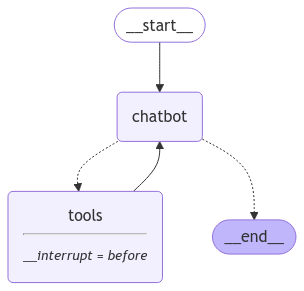
Figure: Chatbot workflow with human-in-the-loop, including the checkpointer and interrupt.
Example - Part 4: Introducing Human-in-the-Loop Workflows (Continued)
Run the Chatbot with Human-in-the-Loop
def stream_graph_updates(user_input: str):
events = graph.stream({"messages": [("user", user_input)]}, config, stream_mode="values")
for event in events:
print("Assistant:", event["messages"][-1].content)
while True:
try:
user_input = input("User: ")
if user_input.lower() in ["quit", "exit", "q"]:
print("Goodbye!")
break
stream_graph_updates(user_input)
except Exception as e:
print(f"Error: {e}")
break
Output
(Question: I'm learning LangGraph. Could you do some research on it for me?)
(2nd chat: Yes)
'''
User: I'm learning LangGraph. Could you do some research on it for me?
Assistant: I'm learning LangGraph. Could you do some research on it for me?
Assistant:
--- HUMAN APPROVAL REQUIRED ---
Tool Call: [{'name': 'tavily_search_results_json', 'args': {'query': 'LangGraph'}, 'id': 'call_eEra3JlSD3leJB5VEg8HzS8c', 'type': 'tool_call'}]
Approve this tool call? (yes/no): yes
Assistant:
Assistant: [{"url": "https://langchain-ai.github.io/langgraph/", "content": "Overview¶ · LangGraph is a library for building stateful, multi-actor applications with LLMs, used to create agent and multi-agent workflows."}, {"url": "https://langchain-ai.github.io/langgraph/tutorials/introduction/", "content": "LangGraph is a library for building stateful, multi-actor applications with LLMs, used to create agent and multi-agent workflows. Compared to other LLM"}]
Assistant: LangGraph is a library for building stateful, multi-actor applications with LLMs (Large Language Models). It is used to create agent and multi-agent workflows. You can find more information about LangGraph on their official website: LangGraph Official Website.
User: q
Goodbye!
'''
You’ll see that before the chatbot uses a tool, it asks for a human to approve first!
To keep this post concise, we’ll highlight the main ideas and outcomes from Part 5 onwards. For a deeper dive, refer to the official LangChain website.
Part 5: Manually Updating the State
In complex AI applications, manual intervention might be necessary to guide the AI’s behavior.
Example Result of Part 5: Manually Updating the State
(Question: I'm learning LangGraph. Could you do some research on it for me?)
(2nd chat: update)
(3rd chat: LangGraph human-in-the-loop workflows)
'''
User: I'm learning LangGraph. Could you do some research on it for me?
Assistant: I'm learning LangGraph. Could you do some research on it for me?
Assistant:
--- HUMAN APPROVAL REQUIRED ---
Tool Call: [{'name': 'tavily_search_results_json', 'args': {'query': 'LangGraph'}, 'id': 'call_jn3MBqHj9HKVsQVgOtiqFTJR', 'type': 'tool_call'}]
Approve this tool call? (yes/no/update): update
Enter the updated query for the tool call: LangGraph human-in-the-loop workflows
--- Original Tool Call ---
{'name': 'tavily_search_results_json', 'args': {'query': 'LangGraph'}, 'id': 'call_jn3MBqHj9HKVsQVgOtiqFTJR', 'type': 'tool_call'}
--- Updated Tool Call ---
{'name': 'tavily_search_results_json', 'args': {'query': 'LangGraph human-in-the-loop workflows'}, 'id': 'call_jn3MBqHj9HKVsQVgOtiqFTJR', 'type': 'tool_call'}
Assistant:
Assistant: [{"url": "https://blog.langchain.dev/making-it-easier-to-build-human-in-the-loop-agents-with-interrupt/", "content": "Making it easier to build human-in-the-loop agents with interrupt Making it easier to build human-in-the-loop agents with interrupt Today, we’re excited to announce a new method to more easily include human-in-the-loop steps in your LangGraph agents: interrupt How we built LangGraph for human-in-the-loop workflows interrupt: a new developer experience for human-in-the-loop We’ve had a few ways of building human in the loop interactions before (breakpoints, NodeInterrupt). When building human-in-the-loop into Python programs, one common way to do this is with the input function. A human can review and edit the state of the graph. We are building LangGraph to be the best agent framework for human-in-the-loop interaction patterns. We’ve updated all of our examples that use human-in-the-loop to use this new functionality."}, {"url": "https://www.youtube.com/watch?v=9BPCV5TYPmg", "content": "In this video, I'll show you how to handle persistence with LangGraph, enabling a unique Human-in-the-Loop workflow."}]
Assistant: I found some information on LangGraph related to human-in-the-loop workflows:
-
Making it easier to build human-in-the-loop agents with interrupt:
- LangGraph has introduced a new method called "interrupt" to include human-in-the-loop steps in agents more easily.
- This method enhances the developer experience for human-in-the-loop workflows in LangGraph.
- LangGraph is designed to be the best agent framework for human-in-the-loop interaction patterns.
-
Video on handling persistence with LangGraph for Human-in-the-Loop workflow:
- The video demonstrates how to handle persistence with LangGraph to enable a unique Human-in-the-Loop workflow.
You can explore these resources to learn more about LangGraph and its human-in-the-loop workflows.
User: q
Goodbye!
'''
Here, the user can choose to update the tool call mid-conversation (LangGraph → LangGraph human-in-the-loop workflows), providing more control and quality assurance.
Part 6: Customizing the State
We can tailor the chatbot’s behavior by adding custom rules.
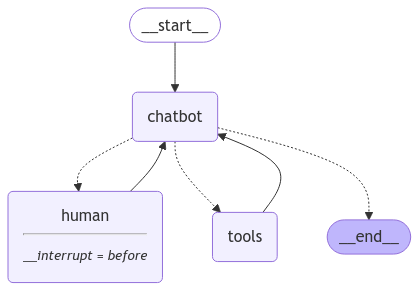
Figure: Workflow showing custom state logic for dynamic chatbot behavior.
Example Result of Part 6: Customizing the State (human node)
(Question: I need some expert guidance for building this AI agent. Could you request assistance for me?)
(2nd chat: We, the experts are here to help! We'd recommend you check out LangGraph to build your agent. It's much more reliable and extensible than simple autonomous agents. but you should explain my answer for my easy understanding at least 100 words, bullet point format.)
'''
User: I need some expert guidance for building this AI agent. Could you request assistance for me?
================================ Human Message =================================
I need some expert guidance for building this AI agent. Could you request assistance for me?
================================== Ai Message ==================================
Tool Calls:
RequestAssistance (call_m37wpsfHLK5tFhwjipgtkfnA)
Call ID: call_m37wpsfHLK5tFhwjipgtkfnA
Args:
request: I need expert guidance for building an AI agent.
================================== Ai Message ==================================
Tool Calls:
RequestAssistance (call_m37wpsfHLK5tFhwjipgtkfnA)
Call ID: call_m37wpsfHLK5tFhwjipgtkfnA
Args:
request: I need expert guidance for building an AI agent.
Human Response (or press Enter to skip): We, the experts are here to help! We'd recommend you check out LangGraph to build your agent. It's much more reliable and extensible than simple autonomous agents. but you should explain my answer for my easy understanding at least 100 words, bullet point format.
================================= Tool Message =================================
We, the experts are here to help! We'd recommend you check out LangGraph to build your agent. It's much more reliable and extensible than simple autonomous agents. but you should explain my answer for my easy understanding at least 100 words, bullet point format.
================================== Ai Message ==================================
Here is a detailed explanation of the recommendation to use LangGraph for building your AI agent in a bullet point format:
- LangGraph is a sophisticated tool that offers advanced capabilities for developing AI agents.
- It provides a reliable and extensible platform for creating intelligent agents with enhanced functionalities.
- LangGraph enables the design of complex conversational agents that can understand and process natural language effectively.
- By utilizing LangGraph, you can enhance user interactions and create more human-like AI agents.
- The tool's natural language processing capabilities allow for the development of intelligent agents that can handle a wide range of queries and tasks.
- LangGraph serves as a robust foundation for building AI agents that deliver engaging and interactive user experiences.
- Overall, LangGraph is a recommended choice for developing AI agents that require advanced language processing and interaction capabilities.
#######################################################################
User: q
Goodbye
'''
Example Result of Part 6: Customizing the State (tools node)
(Question: Current Date, Time, and Temperature (C) in Bangkok)
'''
User: Current Date, Time, and Temperature (C) in Bangkok
================================ Human Message =================================
Current Date, Time, and Temperature (C) in Bangkok
================================== Ai Message ==================================
Tool Calls:
tavily_search_results_json (call_gDhqxXwCO78Y2Zv8jTy2MhjT)
Call ID: call_gDhqxXwCO78Y2Zv8jTy2MhjT
Args:
query: current date and time in Bangkok
tavily_search_results_json (call_qxKvds7fgUdCzgYPY6Tfjs8Y)
Call ID: call_qxKvds7fgUdCzgYPY6Tfjs8Y
Args:
query: current temperature in Bangkok in Celsius
================================= Tool Message =================================
Name: tavily_search_results_json
[{"url": "https://www.accuweather.com/en/th/bangkok/318849/weather-forecast/318849", "content": "Current Weather. 4:07 PM. 92°F. Mostly sunny. RealFeel® 94° · Looking Ahead. Partly sunny this weekend. Bangkok Weather Radar & Maps. Bangkok Weather Radar."}, {"url": "https://www.timeanddate.com/weather/thailand/bangkok", "content": "Weather in Bangkok, Thailand Passing clouds. Feels Like: 82 °FForecast: 92 / 74 °FWind: 5 mph ↑ from Northeast Upcoming 5 hours See more hour-by-hour weather Forecast for the next 48 hours 14 day forecast, day-by-dayHour-by-hour forecast for next week Yesterday's weather Passing clouds. 90 / 77 °FHumidity: 68%. Wind: 6 mph ↑ from North More weather last week Currently at nearby stations Bangkok Metropolis: (5 mi) Passing clouds. (1 hour ago) Bangna Agromet: (8 mi) Passing clouds. (1 hour ago) More weather in Thailand Forecast for the next 2 weeks View historic weather 92 / 74 °F 92 / 76 °F 92 / 75 °F 92 / 76 °F 92 / 77 °F Detailed forecast for 14 days"}]
================================== Ai Message ==================================
The current date and time in Bangkok is Wednesday, December 25, 2024, 5:25 AM. The current temperature in Bangkok is 33°C.
#######################################################################
User: q
Goodbye!
'''
Here, we introduced expert_mode. When active, the chatbot provides detailed responses. When going to tools node, the chatbot directly answers instead of requesting human approval.
Part 7: Time Travel
The chatbot can navigate back to previous conversation steps.
Example Result of Part 7: Time Travel
(Question: I'm learning LangGraph. Could you do some research on it for me?)
(2nd chat: Ya that's helpful. Maybe I'll build an autonomous agent with it!)
'''
================================ Human Message =================================
I'm learning LangGraph. Could you do some research on it for me?
================================== Ai Message ==================================
Tool Calls:
tavily_search_results_json (call_o9dGe4wkZuQbGnGyla48Gbdg)
Call ID: call_o9dGe4wkZuQbGnGyla48Gbdg
Args:
query: LangGraph
================================= Tool Message =================================
Name: tavily_search_results_json
[{"url": "https://langchain-ai.github.io/langgraph/", "content": "Overview¶ · LangGraph is a library for building stateful, multi-actor applications with LLMs, used to create agent and multi-agent workflows."}, {"url": "https://langchain-ai.github.io/langgraph/tutorials/introduction/", "content": "LangGraph is a library for building stateful, multi-actor applications with LLMs, used to create agent and multi-agent workflows. Compared to other LLM"}]
================================== Ai Message ==================================
LangGraph is a library for building stateful, multi-actor applications with LLMs (Large Language Models). It is used to create agent and multi-agent workflows. You can find more information about LangGraph on their official website: LangGraph Official Website.
================================ Human Message =================================
Ya that's helpful. Maybe I'll build an autonomous agent with it!
================================== Ai Message ==================================
That sounds like an exciting project! Building an autonomous agent using LangGraph can be a great way to explore the capabilities of stateful, multi-actor applications with LLMs. If you need any assistance or guidance while working on your project, feel free to reach out. Good luck with building your autonomous agent!
'''
ถ้าเราต้องการย้อนดู chat ก่อนหน้าว่าเกิดอะไรขึ้นสามารถทำได้โดย
for event in graph.stream(None, to_replay.config, stream_mode="values"):
if "messages" in event:
event["messages"][-1].pretty_print()
#output
'''
================================== Ai Message ==================================
That sounds like an exciting project! Building an autonomous agent using LangGraph can be a great way to explore the capabilities of stateful, multi-actor applications with LLMs. If you need any assistance or guidance while working on your project, feel free to reach out. Good luck with building your autonomous agent!
'''
for event in graph.stream(None, to_replay.config, stream_mode="values"):
if "messages" in event:
event["messages"][-3].pretty_print()
#output
'''
================================== Ai Message ==================================
LangGraph is a library for building stateful, multi-actor applications with LLMs (Large Language Models). It is used to create agent and multi-agent workflows. You can find more information about LangGraph on their official website: LangGraph Official Website.
'''
Here, after a chat, we use graph.stream with a previous config object to rerun the conversation, demonstrating how to travel back and review past outputs.
In this episode, we explored how to leverage LangGraph to build a sophisticated chatbot, demonstrating key features like basic chatbot functionality, tool integration for enhanced capabilities, and memory for context awareness. We’ve moved beyond simple interactions and created a chatbot capable of engaging in more dynamic and personalized conversations. For our next episode, we will transition from theory to practical application, showcasing real-world use cases for the advanced techniques we’ve covered. Stay tuned! 🚀
Data Science Explore the world of data science with Donato_Story
Dashboard Discover the power of data visualization with Donato_Story
Donato_Journey Join me on my journey (Thai version)
Course_Review Discover the training courses with Donato_Story (Thai version)
Let’s Connect!
Your thoughts and feedback are invaluable. Feel free to share them in the comments or connect with me on
- Medium: medium.com/donato-story
- Facebook: web.facebook.com/DonatoStory
- Linkedin: linkedin.com/in/nattapong-thanngam
Originally published on Medium
Related

Adaptive RAG
Data Mastery Series — Episode 52: ปรับ RAG ให้ “รู้จักประเมินสถานการณ์” ก่อนลงมือค้นข้อมูล
Agentic RAG
Data Mastery Series — Episode 51: เปลี่ยน RAG ให้ “คิด” ได้

Corrective RAG
Data Mastery Series — Episode 53: RAG ที่ “คิด” ก่อน “ตอบ” และ “แก้ไข” เมื่อผิดพลาด
Exploring Agent with LangChain
Data Mastery Series — Episode 41: LangChain Website (Part 16)