Unpacking Embeddings and Vector Stores with LangChain
Data Mastery Series — Episode 36: LangChain Website (Part 11 )

Connect with me and follow our journey: Linkedin, Facebook
Welcome to Episode 36 of the Data Mastery Series, where we continue our exploration into the exciting world of LangChain! If you’ve been following along, you know how LangChain is revolutionizing the way we build AI applications. Here’s a quick recap of our journey so far:
- Part 1: LangChain Model I/O Basics
- Part 2–3: Prompt Templates and Few-Shot Prompts
- Part 4–6: Deep Dive into Chat Models (Part 1, Part 2, Part 3)
- Part 7: LLM Fundamentals
- Part 8: Output Parsers
- Part 9: Document Loaders
- Part 10: Text Splitter
Note:This post is a reflection of my learning journey with LangChain, inspired by insights from the official documentation and related resources. The content is based on resources found link. I hope it proves valuable to you!
In today’s episode, we’re tackling the core of many AI applications: Embeddings and Vector Stores. By the end of this post, you’ll have a solid grasp on how embeddings magically transform text into mathematical vectors and how vector stores act like super-powered search engines for those vectors. Let’s dive in!
Text Embeddings: Giving Meaning to Numbers
Imagine comparing text not by exact words but by meaning. That’s the magic of text embeddings! These are mathematical representations of text in a multi-dimensional space where similar meanings are placed closer together.
For example, “Hello, World!” and “Hi, everyone!” might sit near each other because they share similar greetings.
LangChain makes working with embeddings seamless, supporting popular models like OpenAI, Cohere, and Hugging Face. You’ll typically use two primary methods:
**embed_documents**: For turning multiple pieces of text into vectors (ideal for indexing your data)**embed_query**: For turning a single query into a vector (when you’re asking a question).
Example - embed_documents
embeddings = embeddings_model.embed_documents(
[
"Hi there!",
"Oh, hello!",
"What's your name?",
"My friends call me World",
"Hello World!"
]
)
len(embeddings), len(embeddings[0])
Output
'''
(5, 1536)
'''
Example - embed_query
embedded_query = embeddings_model.embed_query("What was the name mentioned in the conversation?")
print(embedded_query[:5])
Output
'''
[0.005329647101461887, -0.0006122003542259336, 0.0389961302280426, -0.002898985054343939, -0.008904732763767242]
'''
Caching: Optimizing Embedding Workflows
Embedding the same text repeatedly can be computationally expensive. Enter caching — a memory system that stores embeddings and avoids redundant computations. This significantly speeds up your workflow and conserves resources.
LangChain provides two tools for caching:
- CacheBackedEmbeddings: Wraps an embedding model and stores results in a key-value store.
- LocalFileStore: Saves cached embeddings locally for easy retrieval.
Example - Caching
store = LocalFileStore("./cache/")
underlying_embeddings = OpenAIEmbeddings(api_key=OPENAI_API_KEY)
cached_embedder = CacheBackedEmbeddings.from_bytes_store(
underlying_embeddings,
store,
namespace=underlying_embeddings.model
)
raw_documents = TextLoader("state_of_the_union.txt").load()
text_splitter = CharacterTextSplitter(chunk_size=1000, chunk_overlap=0)
documents = text_splitter.split_documents(raw_documents)
First time embedding
%%time
db = FAISS.from_documents(documents, cached_embedder)
Output First time embedding
'''
CPU times: user 170 ms, sys: 5.92 ms, total: 176 ms
Wall time: 418 ms
'''
Check cache performance on subsequent calls
%%time
db2 = FAISS.from_documents(documents, cached_embedder)
Output Second time embedding
'''
CPU times: user 39.8 ms, sys: 0 ns, total: 39.8 ms
Wall time: 39.6 ms
'''
As you can see, the second time we ran the code, the system pulled vectors from the cache, significantly saving time and computational resources.
Vector Stores: The Heart of Similarity Search
Once you have embeddings, the next step is storing them in a vector store. These stores enable you to:
- Save embeddings as vector representations.
- Retrieve relevant results through semantic similarity search.
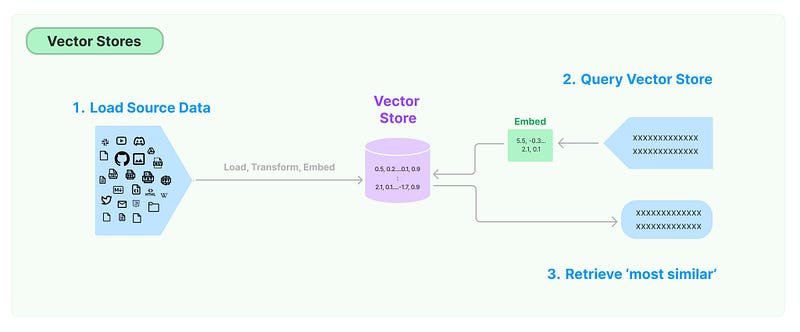
Image from https://python.langchain.com/v0.1/docs/modules/data%5Fconnection/vectorstores/
LangChain offers integrations with various vector stores, including FAISS, Chroma, and Pinecone. Here’s an example using Chroma:
Example - Vector Stores
Load and split text
raw_documents = TextLoader("state_of_the_union.txt").load()
text_splitter = CharacterTextSplitter(chunk_size=1000, chunk_overlap=0)
documents = text_splitter.split_documents(raw_documents)
Create the vector store
db = Chroma.from_documents(documents, OpenAIEmbeddings())
Perform a similarity search
query = "What did the president say about voting rights?"
docs = db.similarity_search(query)
print(docs[0].page_content)
Output
'''
Tonight. I call on the Senate to: Pass the Freedom to Vote Act. Pass the John Lewis Voting Rights Act. And while you're at it, pass the Disclose Act so Americans can know who is funding our elections.
Tonight, I'd like to honor someone who has dedicated his life to serve this country: Justice Stephen Breyer-an Army veteran, Constitutional scholar, and retiring Justice of the United States Supreme Court. Justice Breyer, thank you for your service.
One of the most serious constitutional responsibilities a President has is nominating someone to serve on the United States Supreme Court.
And I did that 4 days ago, when I nominated Circuit Court of Appeals Judge Ketanji Brown Jackson. One of our nation's top legal minds, who will continue Justice Breyer's legacy of excellence.
'''
Key Takeaways
In this episode, we explored how LangChain empowers embeddings and vector stores:
- Embeddings: Convert text into meaningful mathematical representations.
- Caching: Saves time by avoiding redundant computations.
- Vector Stores: Enable fast and efficient semantic search.
By mastering these tools, you’re building a foundation for intelligent and scalable AI systems.
Stay tuned for the next episode, where we’ll dive into advanced retrieval techniques and how to optimize your AI workflows even further. 🚀
Data Science Explore the world of data science with Donato_Story
Dashboard Discover the power of data visualization with Donato_Story
Donato_Journey Join me on my journey (Thai version)
Course_Review Discover the training courses with Donato_Story (Thai version)
Let’s Connect!
Your thoughts and feedback are invaluable. Feel free to share them in the comments or connect with me on
- Medium: medium.com/donato-story
- Facebook: web.facebook.com/DonatoStory
- Linkedin: linkedin.com/in/nattapong-thanngam
Originally published on Medium
Related

Chat with Document: A Closer Look at Splitting, Embeddings, and RAG
Data Mastery Series — Episode 21: The Chat with Document and Langchain Series (Part 2)

Chat with Document: Basics and Demonstrations
Data Mastery Series — Episode 20: The Chat with Document and Langchain Series (Part 1)

Continue Exploring Chat Models with LangChain
Data Mastery Series — Episode 31: LangChain Website (Part 6)
Continue Exploring Retrievers with LangChain
Data Mastery Series — Episode 39: LangChain Website (Part 14 )