SQL Agent
Data Mastery Series — Episode 55: สร้าง Agent คุยกับฐานข้อมูลได้เอง พร้อมวิเคราะห์และแก้ไขข้อผิดพลาด
📌 Connect with me and follow our journey: Linkedin, Facebook
ในซีรีส์ Data Mastery เราได้เดินทางผ่านวิวัฒนาการของ RAG มาแล้วหลายตอน:
- EP.50 — LangGraph Introduction: จาก LangChain → LangGraph
- EP.51 — Agentic RAG: เปลี่ยน RAG ให้ “คิด” ได้
- EP.52 — Adaptive RAG: ปรับ RAG ให้ “รู้จักประเมินสถานการณ์” ก่อนลงมือค้นข้อมูล
- EP.53 — Corrective RAG: RAG ที่ “คิด” ก่อน “ตอบ” และ “แก้ไข” เมื่อผิดพลาด
- EP.54— Self RAG: RAG ที่ “ประเมินตัวเอง” และ “ปรับปรุง” เพื่อผลลัพธ์ที่ดีกว่า
หลายคนอาจคุ้นเคยกับ RAG ที่ดึงข้อมูลจาก vector store แต่ถ้าข้อมูลอยู่ในรูปแบบ Structured Data เช่น SQL Database ล่ะ?
SQL Agent คือคำตอบ — เราจะใช้ LLM + LangGraph เพื่อสร้าง Agent ที่สามารถ:
- วิเคราะห์คำถามจากผู้ใช้
- เลือก table ที่เกี่ยวข้อง
- อ่านโครงสร้าง schema
- สร้าง SQL query อย่างถูกต้อง
- ตรวจสอบและแก้ไข query หากมีข้อผิดพลาด
- ตอบคำถามด้วยภาษามนุษย์อย่างแม่นยำ
🔁 กระบวนการทำงานของ SQL Agent
เพื่อให้เห็นภาพ เราจะเริ่มจากผลลัพธ์จริงที่ระบบตอบได้:
User question: Which music genre sold the most in 2009?
AI Answer: The music genre that sold the most in 2009 was Rock.
และรายละเอียดของ input และ output ในแต่ละ node
User question: Which music genre sold the most in 2009?
first_tool_call_step
Step 1: first_tool_call
- Input:
'user: Which music genre sold the most in 2009?' - Output:
'Tool call to: sql_db_list_tables'
Step 2: list_tables_tool
- Input:
'Tool call or system message' - Output:
('Album, Artist, Customer, Employee, Genre, Invoice, InvoiceLine, MediaType, Playlist, '
'PlaylistTrack, Track')
Step 3: model_get_schema
- Input:
('Album, Artist, Customer, Employee, Genre, Invoice, InvoiceLine, MediaType, Playlist, '
'PlaylistTrack, Track') - Output:
"Tool calls to get schema of: ['Genre, InvoiceLine, Track']"
Step 4: get_schema_tool
- Input:
'Tool call or system message' - Output:
[ '\n'
'CREATE TABLE "Genre" (\n'
'\t"GenreId" INTEGER NOT NULL, \n'
'\t"Name" NVARCHAR(120), \n'
'\tPRIMARY KEY ("GenreId")\n'
')\n'
'\n'
'/\n'
'3 rows from Genre table:\n'
'GenreId\tName\n'
'1\tRock\n'
'2\tJazz\n'
'3\tMetal\n'
'/\n'
...
]
query_gen_node_step
should_continue_step
Step 5: query_gen
- Input:
[ '\n'
'CREATE TABLE "Genre" (\n'
'\t"GenreId" INTEGER NOT NULL, \n'
'\t"Name" NVARCHAR(120), \n'
'\tPRIMARY KEY ("GenreId")\n'
')\n'
'\n'
'/\n'
'3 rows from Genre table:\n'
'GenreId\tName\n'
'1\tRock\n'
'2\tJazz\n'
'3\tMetal\n'
'/\n'
...
] - Output:
'The music genre that sold the most in 2009 was Rock.'
##################################################
Summary
- User question: Which music genre sold the most in 2009?
- AI Answer: The music genre that sold the most in 2009 was Rock.
- Route: start --> first_tool_call --> list_tables_tool --> model_get_schema --> get_schema_tool --> query_gen --> end
##################################################
เส้นทางของ Agent ที่เกิดขึ้นคือ:
start → first_tool_call→ list_tables_tool → model_get_schema → get_schema_tool → query_gen → end
⚙️ อธิบายการทำงานของแต่ละ Node ใน Workflow
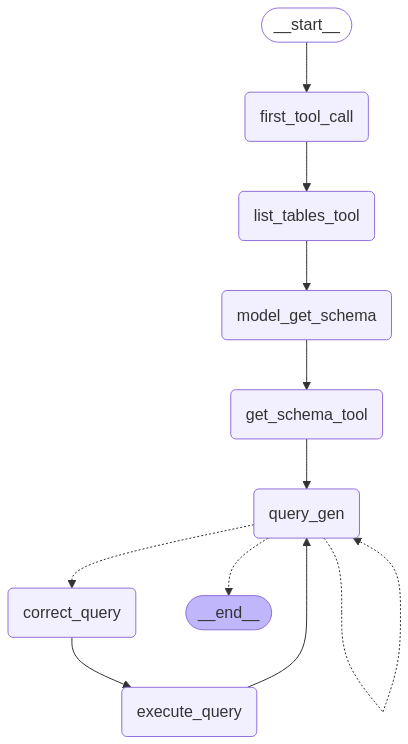
Figure: SQL Agent Workflow
✅ Step 1: first_tool_call
- หน้าที่: ให้ LLM เริ่มต้นโดย “เลือก” tool ที่จะใช้ก่อน เช่น
sql_db_list_tables - 📝 Input:
"user: Which music genre sold the most in 2009?" - 📤 Output:
Tool call to: sql_db_list_tables
- วัตถุประสงค์:
รองรับการมีหลาย tools ในอนาคต เช่น web search, document retriever โดยให้ LLM ตัดสินใจเริ่มต้นเอง
✅ Step 2: list_tables_tool
- หน้าที่: เรียก tool จริงเพื่อดึงรายชื่อตารางทั้งหมดในฐานข้อมูล
- 📝 Input: Tool call message
- 📤 Output:
'Album, Artist, Customer, Employee, Genre, Invoice, InvoiceLine, MediaType, Playlist, PlaylistTra
- วัตถุประสงค์:
ให้ LLM เห็น context ว่ามีตารางใดบ้าง เพื่อวางแผนตอบคำถาม
✅ Step 3: model_get_schema
- หน้าที่: ให้ LLM วิเคราะห์ชื่อ table แล้วเลือกว่าจะดู schema ของตารางไหน
- 📝 Input: รายชื่อตารางทั้งหมด
- 📤 Output:
Tool calls to get schema of: ['Genre', 'InvoiceLine', 'Track']
- วัตถุประสงค์:
เลือกตารางที่เกี่ยวข้องกับคำถาม เช่น “แนวเพลง” → Genre, การขาย → InvoiceLine, เพลง → Track
✅ Step 4: get_schema_tool
- หน้าที่: ดึง schema ของตารางที่เลือก (CREATE TABLE + ตัวอย่างข้อมูล)
- 📝 Input: Tool call เพื่อขอ schema
- 📤 Output:
ตัวอย่าง schema เช่น:
CREATE TABLE "Genre" (
"GenreId" INTEGER NOT NULL,
"Name" NVARCHAR(120),
PRIMARY KEY ("GenreId")
)
3 rows from Genre:
GenreId | Name
1 | Rock
2 | Jazz
3 | Metal
- วัตถุประสงค์:
ให้ LLM เข้าใจความสัมพันธ์ของข้อมูลในฐานข้อมูล เช่นGenre → Track → InvoiceLine
✅ Step 5: query_gen
- หน้าที่: LLM เขียน SQL query จาก schema และตอบคำถามเ
- 📝 Input: ข้อมูล schema ที่ได้จากขั้นตอนก่อนหน้า
- 📤 Output:
The music genre that sold the most in 2009 was Rock.
วัตถุประสงค์:
สร้างคำตอบแบบอัตโนมัติที่แม่นยำ และหากผิดพลาดจะมี mechanism ตรวจสอบและแก้ไข
🔄 กลไกเงื่อนไขนอกเหนือจาก node ข้างต้น
✅ should_continue
- หลังจาก
query_genทำงานเสร็จ ระบบจะส่งstateไปให้ฟังก์ชันshould_continue()เพื่อ “ตัดสินใจเส้นทางถัดไป”
workflow.add_conditional_edges(
"query_gen", # Node ที่จะต่อเงื่อนไขจาก
should_continue, # ฟังก์ชันตัดสินว่าจะไป node ไหนต่อ
)
- ผลลัพธ์ของ
should_continue()จะบอกให้ไป Node ไหนต่อไป
def should_continue(state: State) -> Literal[END, "correct_query", "query_gen"]:
last_message = state["messages"][-1]
if getattr(last_message, "tool_calls", None):
return END
if last_message.content.startswith("Error:"):
return "query_gen"
else:
return "correct_query"
- ✅ หาก LLM เรียก tool ส่งคำตอบกลับแล้ว → ไป
END - 🔁 หากมี error หรือเนื้อหายังไม่สมบูรณ์ → วนไป
correct_queryหรือquery_genเพื่อแก้ไข
🔧 correct_query
หน้าที่: ตรวจสอบ query ที่มีปัญหา เช่น syntax error หรือ logic ผิด
ให้ LLM วิเคราะห์แล้ว rewrite query ใหม่ให้ถูกต้อง
🔧 execute_query
หน้าที่: รัน SQL query ที่ผ่านการตรวจสอบแล้วจริงกับฐานข้อมูล
และส่งผลลัพธ์กลับมาให้ LLM สรุปคำตอบ
การสร้าง SQL Agent ด้วย LangGraph ไม่เพียงช่วยให้ LLM เข้าใจและโต้ตอบกับฐานข้อมูลได้อย่างแม่นยำ แต่ยังเปิดทางให้เราสร้างระบบที่ “เข้าใจบริบท”, “ตรวจสอบคำตอบได้” และ “แก้ไขตัวเองได้เมื่อผิดพลาด” กระบวนการทั้งหมดตั้งแต่การวิเคราะห์คำถาม → ดึง schema → สร้าง query → ตรวจสอบความถูกต้อง ไปจนถึงการตอบกลับในรูปแบบภาษามนุษย์ เป็นการผสานความสามารถของ LLM เข้ากับโครงสร้างข้อมูลแบบดั้งเดิมอย่างมีประสิทธิภาพ
ในตอนถัดไปของ Data Mastery Series เราจะพาไปสำรวจ Use Case ต่าง ๆ ของ SQL Agent ที่ได้รับการนำเสนอในเว็บไซต์ทางการของ LangGraph ฝากติดตามด้วยนะครับ ^__^
Data Science Explore the world of data science with Donato_Story
Dashboard Discover the power of data visualization with Donato_Story
Donato_Journey Join me on my journey (Thai version)
Course_Review Discover the training courses with Donato_Story (Thai version)
Let’s Connect!
Your thoughts and feedback are invaluable. Feel free to share them in the comments or connect with me on
- 🌐 Medium: medium.com/donato-story
- 📘Facebook: web.facebook.com/DonatoStory
- 💼 Linkedin: linkedin.com/in/nattapong-thanngam
Originally published on Medium
Related

Corrective RAG
Data Mastery Series — Episode 53: RAG ที่ “คิด” ก่อน “ตอบ” และ “แก้ไข” เมื่อผิดพลาด

Hierarchical Multi-Agent Systems
Data Mastery Series — Episode 59: การสร้างระบบ AI ทีมงานด้วย Supervisor Agent กับทีมย่อย
LangGraph Introduction
Data Mastery Series — Episode 50: Next-Level Chat with Document

LLM Note 2
Data Mastery Series — Episode 47: Summarization Techniques and Advanced RAG