Self-RAG
Data Mastery Series — Episode 54: RAG ที่ “ประเมินตัวเอง” และ “ปรับปรุง” เพื่อผลลัพธ์ที่ดีกว่า

📌 Connect with me and follow our journey: Linkedin, Facebook
ในซีรีส์ Data Mastery เราได้เดินทางผ่านวิวัฒนาการของ RAG มาแล้วหลายตอน:
- EP.50 — LangGraph Introduction: จาก LangChain → LangGraph
- EP.51 — Agentic RAG: เปลี่ยน RAG ให้ “คิด” ได้
- EP.52 — Adaptive RAG: ปรับ RAG ให้ “รู้จักประเมินสถานการณ์” ก่อนลงมือค้นข้อมูล
- EP.53 — Corrective RAG: RAG ที่ “คิด” ก่อน “ตอบ” และ “แก้ไข” เมื่อผิดพลาด
ใน EP.54 นี้ เราจะไปอีกขั้นกับแนวคิดใหม่ — Self-RAG หรือ Self-Reflective RAG
ระบบที่ไม่เพียงแค่ “ดึงข้อมูล” และ “ตอบ” แต่ยัง ประเมินคำตอบของตัวเอง และ ปรับปรุงซ้ำ หากยังไม่ดีพอ
1. Self-RAG คืออะไร?
Self-RAG (Self-Reflective Retrieval-Augmented Generation)
คือการเพิ่ม “กลไกสะท้อนตัวเอง” หรือ self-grading เข้ามาใน RAG เพื่อให้ระบบสามารถตรวจสอบ ทั้งเอกสารที่ดึงมา และ คำตอบที่ LLM สร้าง ก่อนตอบผู้ใช้จริง
💡 พูดง่าย ๆ:
Self-RAG คือ RAG ที่มี “Self-check และ Self-improve” ช่วยลดคำตอบที่หลอน (hallucination), ไม่ตรงคำถาม และเพิ่มความน่าเชื่อถืออย่างเป็นระบบ
2. อธิบายภาพ Workflow (Self-RAG Diagram)
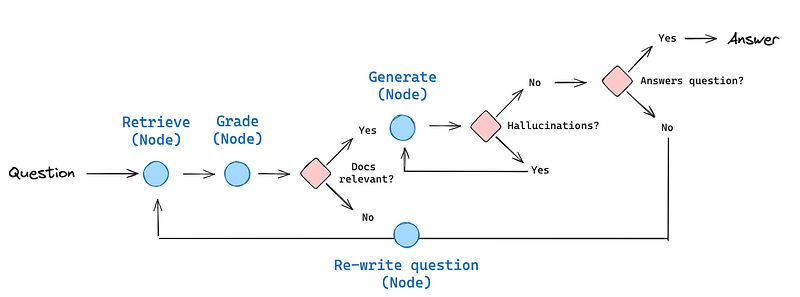
Self-RAG ทำงานแบบวน loop เพื่อ refine คำตอบ โดยประกอบด้วย:
- Retrieve (Node): ดึงเอกสารจาก knowledge base ตามคำถาม
- Grade (Node): ตรวจสอบว่าเอกสารที่ retrieve มานั้นเกี่ยวข้องหรือไม่
→ ถ้า ไม่เกี่ยวข้องเลย → ไป Re-write Question - Docs relevant?: เป็นจุดตัดสินใจว่าเอกสารเพียงพอไหม
→ Yes → สร้างคำตอบ
→ No → ปรับคำถามใหม่ให้ชัดขึ้น - Generate (Node): สร้างคำตอบจากเอกสารที่คัดกรองแล้ว
- Hallucinations?: ตรวจสอบว่า LLM อ้างอิงเอกสารจริงไหม
→ ถ้า hallucinate → วนกลับไป Generate ใหม่ - Answers question?: ตรวจว่าคำตอบ ตรงกับคำถามไหม
→ ถ้าไม่ตรง → ไป Re-write คำถาม
→ ถ้าผ่านทุกเกณฑ์ → ส่งคำตอบกลับผู้ใช้
ใน Self-RAG: Learning to Retrieve, Generate, and Critique through Self-Reflection paper ได้แสดงตัวอย่างการตัดสินใจไว้ดังนี้
จุดเด่นของ Self-RAG
- ✅ ตรวจสอบ ทั้งเอกสาร และ คำตอบ ก่อนตอบ
- 🔁 วน loop เพื่อแก้ไขเมื่อคำตอบยังไม่ดีพอ
- ⚠️ ลด hallucination และความคลุมเครือ
- 📈 ยกระดับความน่าเชื่อถือของ RAG อย่างชัดเจน
2. ประเด็นสำคัญๆ ของ Self-RAG
Function หรือ Coding ต่างๆจะคล้ายกับ Basic LangGraph , Agentic RAG , Adaptive RAG , และ Corrective RAG ซึ่งได้อธิบายไว้ใน 4 ตอนก่อนหน้า ดังนั้นจะขอข้ามไปดูที่ Flow เลย
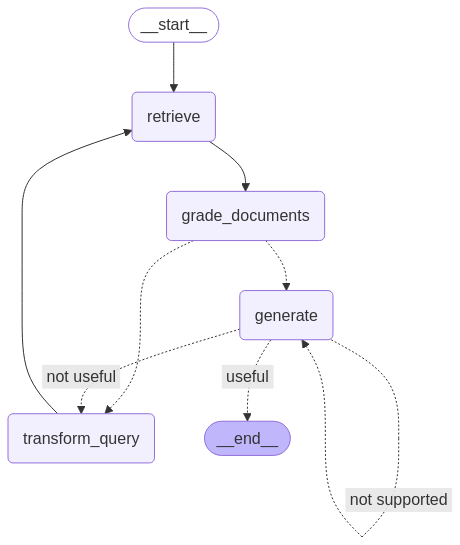
Node หลัก ๆ จากภาพ workflow ด้านบนประกอบด้วย
retrieve(state): ดึงเอกสารจาก vectorstore ตามคำถามผู้ใช้grade_documents(state): ตรวจสอบว่าเอกสารที่ดึงมานั้น เกี่ยวข้อง หรือไม่generate(state): สร้างคำตอบจากเอกสารที่ผ่านการกรอง
- มีคุณภาพ (useful) → ส่งคำตอบไปหา user
- ไม่ตรงคำถาม (not useful) → วนไปtransform_query- หรือ hallucinate (not supported) → วนกลับมาgenerateอีกครั้งtransform_query(state): ปรับคำถามใหม่ให้ชัดขึ้น เมื่อเอกสารหรือคำตอบยังไม่เพียงพอ
ตัวอย่างการถามตอบ
คำถามที่ 1: “Explain how chain of thought prompting works?”
- AI Route and Decisions: <ช่วยเขียนอธิบายการทำงาน>
-RETRIEVE→ ได้เอกสารจาก vectorstore
-GRADE_DOCUMENTS→ มีเอกสารเกี่ยวข้อง
-GENERATE→ LLM สร้างคำตอบ grounded
-TRANSFORM_QUERY→ ผ่านทั้ง hallucination และ answer check - คำตอบ:
Chain-of-thought (CoT) prompting involves generating a sequence of short sentences that describe reasoning steps, known as reasoning chains or rationales, to lead to a final answer. This method is particularly beneficial for complex reasoning tasks and is more effective with large models. CoT can be implemented in two main ways: few-shot CoT, which uses demonstrations with high-quality reasoning chains, and zero-shot CoT, which encourages the model to generate reasoning chains through natural language prompts. - Route:
start→retrieve→grade_documents→generate→end
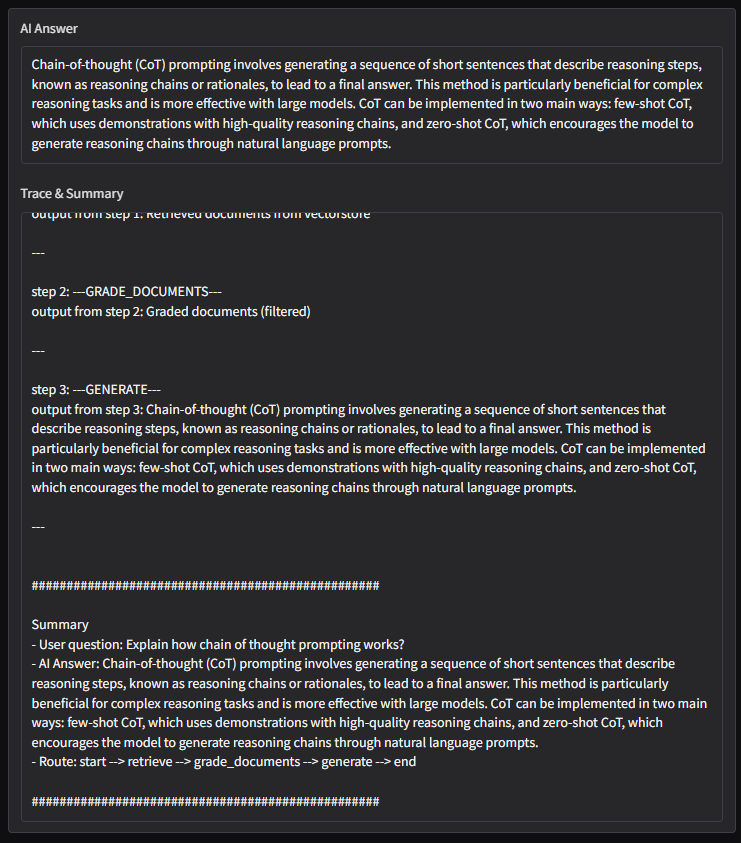
Figure: Question_Explain how chain of thought prompting works?
คำถามที่ 2: “Recommend food from Thailand 3 item”
- ข้อมูลใน vectorstore ไม่มีคำตอบ
- ระบบวนซ้ำ
transform → retrieve → gradeหลายรอบ - ไม่สามารถหาเอกสารที่ตรงได้
❌ ติด loop และหยุดที่ recursion limit - Result with Error:
---RETRIEVE---
"Node 'retrieve':"
'\n---\n'
---GRADE DOCUMENT & CHECK DOCUMENT RELEVANCE TO QUESTION---
---GRADE: DOCUMENT NOT RELEVANT---
---GRADE: DOCUMENT NOT RELEVANT---
---GRADE: DOCUMENT NOT RELEVANT---
---GRADE: DOCUMENT NOT RELEVANT---
---ASSESS GRADED DOCUMENTS---
---DECISION: ALL DOCUMENTS ARE NOT RELEVANT TO QUESTION, TRANSFORM QUERY---
"Node 'grade_documents':"
'\n---\n'
---TRANSFORM QUERY---
---TRANSFORMED QUESTION---
What are three popular Thai dishes you would recommend trying?
"Node 'transform_query':"
'\n---\n'
---RETRIEVE---
"Node 'retrieve':"
'\n---\n'
---GRADE DOCUMENT & CHECK DOCUMENT RELEVANCE TO QUESTION---
---GRADE: DOCUMENT NOT RELEVANT---
---GRADE: DOCUMENT NOT RELEVANT---
---GRADE: DOCUMENT NOT RELEVANT---
---GRADE: DOCUMENT NOT RELEVANT---
---ASSESS GRADED DOCUMENTS---
---DECISION: ALL DOCUMENTS ARE NOT RELEVANT TO QUESTION, TRANSFORM QUERY---
...
---RETRIEVE---
"Node 'retrieve':"
'\n---\n'
---GRADE DOCUMENT & CHECK DOCUMENT RELEVANCE TO QUESTION---
---GRADE: DOCUMENT NOT RELEVANT---
---GRADE: DOCUMENT NOT RELEVANT---
---GRADE: DOCUMENT NOT RELEVANT---
---GRADE: DOCUMENT NOT RELEVANT---
---ASSESS GRADED DOCUMENTS---
---DECISION: ALL DOCUMENTS ARE NOT RELEVANT TO QUESTION, TRANSFORM QUERY---
"Node 'grade_documents':"
'\n---\n'
---TRANSFORM QUERY---
---TRANSFORMED QUESTION---
What are three must-try Thai dishes that are both highly recommended and popular?
"Node 'transform_query':"
'\n---\n'
---RETRIEVE---
"Node 'retrieve':"
'\n---\n'
GraphRecursionError Traceback (most recent call last)
in <cell line: 0>()
1 inputs = {"question": "Recommend food from Thailand 3 item"}
----> 2 for output in app.stream(inputs):
3 for key, value in output.items():
4 # Node
5 pprint(f"Node '{key}':")
/usr/local/lib/python3.11/dist-packages/langgraph/pregel/init.py in stream(self, input, config, stream_mode, output_keys, interrupt_before, interrupt_after, checkpoint_during, debug, subgraphs)
2374 error_code=ErrorCode.GRAPH_RECURSION_LIMIT,
2375 )
-> 2376 raise GraphRecursionError(msg)
2377 # set final channel values as run output
2378 run_manager.on_chain_end(loop.output)
GraphRecursionError: Recursion limit of 25 reached without hitting a stop condition. You can increase the limit by setting the recursion_limit config key.
For troubleshooting, visit: https://python.langchain.com/docs/troubleshooting/errors/GRAPH_RECURSION_LIMIT
แสดงให้เห็นถึงความสำคัญของ web search fallback หรือ external data ในกรณีที่ retrieval ล้มเหลว
Self-RAG เป็นก้าวต่อไปของ RAG ที่เน้น “คุณภาพคำตอบ” มากกว่าแค่การ “หาข้อมูลให้ครบ” ระบบจะเรียนรู้และประเมินตัวเองในทุกขั้นตอน — ช่วยให้ได้คำตอบที่ดีขึ้นโดยไม่ต้องอาศัย prompt ที่ซับซ้อน
ใน EP.55 เราจะลงลึกกับ SQL Agent ระบบที่ช่วยให้ LLM แปลงคำถามภาษาไทยเป็น SQL → สร้าง insight ได้จากข้อมูลจริง ฝากติดตามด้วยนะครับ !
Data Science Explore the world of data science with Donato_Story
Dashboard Discover the power of data visualization with Donato_Story
Donato_Journey Join me on my journey (Thai version)
Course_Review Discover the training courses with Donato_Story (Thai version)
Let’s Connect!
Your thoughts and feedback are invaluable. Feel free to share them in the comments or connect with me on
- 🌐 Medium: medium.com/donato-story
- 📘Facebook: web.facebook.com/DonatoStory
- 💼 Linkedin: linkedin.com/in/nattapong-thanngam
Originally published on Medium
Related

Corrective RAG
Data Mastery Series — Episode 53: RAG ที่ “คิด” ก่อน “ตอบ” และ “แก้ไข” เมื่อผิดพลาด

Hierarchical Multi-Agent Systems
Data Mastery Series — Episode 59: การสร้างระบบ AI ทีมงานด้วย Supervisor Agent กับทีมย่อย
LangGraph Introduction
Data Mastery Series — Episode 50: Next-Level Chat with Document

LLM Note 2
Data Mastery Series — Episode 47: Summarization Techniques and Advanced RAG