Prompt Template Agent
Data Mastery Series — Episode 56: สร้าง Agent สัมภาษณ์ผู้ใช้ เพื่อออกแบบ Prompt ได้เอง!

📌 Connect with me and follow our journey: Linkedin, Facebook
ในซีรีส์ Data Mastery เราได้สำรวจศักยภาพของ LangGraph มาแล้วหลายตอน ตั้งแต่พื้นฐานไปจนถึงการประยุกต์ใช้ในงานระดับสูง:
- EP.50 — LangGraph Introduction: จาก LangChain → LangGraph
- EP.51 — Agentic RAG: เปลี่ยน RAG ให้ “คิด” ได้
- EP.52 — Adaptive RAG: ปรับ RAG ให้ “รู้จักประเมินสถานการณ์” ก่อนลงมือค้นข้อมูล
- EP.53 — Corrective RAG: RAG ที่ “คิด” ก่อน “ตอบ” และ “แก้ไข” เมื่อผิดพลาด
- EP.54 — Self RAG: RAG ที่ “ประเมินตัวเอง” และ “ปรับปรุง” เพื่อผลลัพธ์ที่ดีกว่า
- EP.55— SQL RAG: สร้าง Agent คุยกับฐานข้อมูลได้เอง พร้อมวิเคราะห์และแก้ไขข้อผิดพลาด
และใน EP.56 นี้ เราจะพาทุกคนไปรู้จักกับ Prompt Template Agent — Agent ที่ช่วยผู้ใช้ออกแบบ Prompt ได้เองผ่านการถาม-ตอบอย่างมีแบบแผน
🧩 แนวคิดของ Prompt Template Agent
Agent นี้ออกแบบมาให้สามารถรวบรวมข้อมูลจากผู้ใช้ ได้แก่:
- 🎯 Objective ของ prompt คืออะไร
- 🧩 Variables ที่จะใช้มีอะไรบ้าง
- 🚫 ข้อจำกัด (Constraints) ที่ไม่ควรทำ
- ✅ ข้อกำหนด (Requirements) ที่ผลลัพธ์ต้องมี
หลังจากรวบรวมข้อมูลครบ Agent จะสร้าง prompt template ที่พร้อมใช้งานทันที
✨ Use case นี้ปรากฏอยู่ใน LangGraph official docs ภายใต้หัวข้อ
“Prompt Generation from User Requirements: Build an Information Gathering Chatbot”
✅ สามารถนำไปประยุกต์ใช้ต่อยอดในงานอื่น ๆ ได้ เช่น การกรอกฟอร์ม, สอบถามรายละเอียดการสั่งซื้อ ฯลฯ
🔁 Workflow Graph & Function ที่เกี่ยวข้อง
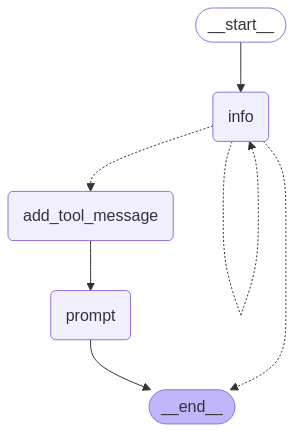
Figure: Prompt Template Agent Workflow
ในระบบนี้ เราสร้าง workflow ด้วย LangGraph โดยมี node หลัก ๆ ดังนี้:
✅ info(state)
- หน้าที่: ถามคำถามเพื่อเก็บข้อมูลจากผู้ใช้ ได้แก่ Objective, Variables, Constraints, Requirements
- 🛠 ใช้เครื่องมือ:
PromptInstructionsซึ่งเป็น structured tool สำหรับจัด schema
✅ add_tool_message(state)
- หน้าที่: เมื่อตอบครบและเรียก tool ได้แล้ว → ส่ง ToolMessage เพื่อบอกว่า “ข้อมูลพร้อมแล้ว”
✅ prompt(state)
- หน้าที่: ใช้ข้อมูลจาก Tool เพื่อสร้าง Prompt Template ตาม format ที่กำหนดไว้
📌 Objective: ...
🧾 Prompt:
{template ที่ generate ได้}
✅ get_state
- ฟังก์ชันนี้ใช้ใน conditional route เพื่อตัดสินใจว่ายังอยู่ในขั้น
infoหรือจะไปadd_tool_messageหรือEND
workflow.add_conditional_edges("info", get_state, ["add_tool_message", "info", END])
🔍 ตัวอย่างการใช้งานจริง
ลองมาดูตัวอย่างการใช้งานจริงของ Prompt Template Agent ผ่านการสนทนาระหว่างผู้ใช้กับระบบ ซึ่งแสดงให้เห็นขั้นตอนทั้งหมดของ workflow:
User (q/Q to quit): hi
================================== Ai Message ==================================
Hello! How can I assist you today?
Route: start --> info --> end
User (q/Q to quit): I want to create a prompt for analyzing the sentiment of a piece of text.
================================== Ai Message ==================================
What variables will be passed into the prompt template for analyzing the sentiment of a piece of text?
Route: start --> info --> end
User (q/Q to quit): I love pizza
================================== Ai Message ==================================
Any constraints for what the output should NOT do when analyzing the sentiment of a piece of text?
Route: start --> info --> end
User (q/Q to quit): text
================================== Ai Message ==================================
Any requirements that the output MUST adhere to when analyzing the sentiment of a piece of text?
Route: start --> info --> end
User (q/Q to quit): How are you?
================================== Ai Message ==================================
I'm here to assist you with creating a prompt template. Could you please provide more information about the constraints for the output when analyzing the sentiment of a piece of text?
Route: start --> info --> end
User (q/Q to quit): Should not include any opinions or interpretations
================================== Ai Message ==================================
Any requirements that the output MUST adhere to when analyzing the sentiment of a piece of text?
Route: start --> info --> end
User (q/Q to quit): Must return only the sentiment label
================================== Ai Message ==================================
Tool Calls:
PromptInstructions (call_8x3q1FjWfVl7O78R1ckZuH7C)
Call ID: call_8x3q1FjWfVl7O78R1ckZuH7C
Args:
objective: Analyze the sentiment of a piece of text.
variables: ['text']
constraints: ['Should not include any opinions or interpretations']
requirements: ['Must return only the sentiment label']
================================= Tool Message =================================
Prompt generated!
================================== Ai Message ==================================
Great! Based on the requirements you provided, here is the prompt template for analyzing the sentiment of a piece of text:
Objective: Analyze the sentiment of a piece of text.
Variables: text
Constraints: Should not include any opinions or interpretations.
Requirements: Must return only the sentiment label.
Please analyze the sentiment of the following text and provide the sentiment label:
{{text}}
Make sure to only return the sentiment label without any opinions or interpretations.
Route: start --> info --> add_tool_message --> prompt --> end
✅ Prompt generation completed.
User (q/Q to quit): q
✅ Step 1: info - เริ่มต้นการสนทนา
- หน้าที่: เริ่มต้นถามผู้ใช้เพื่อรวบรวมข้อมูลที่จำเป็นสำหรับสร้าง prompt template ได้แก่ Objective, Variables, Constraints และ Requirements
- 📝 Input:
User: hi - 📤 Output:
AI: Hello! How can I assist you today? - 📍Route:
start → info → end - 🧠 จากโค้ด: LLM สร้างข้อความจาก
templateที่อยู่ในget_messages_info()แต่เนื่องจากเป็นการทักทายปกติ จึงตอบกลับไปตามปกติ
template = """Your job is to get information from a user about what type of prompt template they want to create.
You should get the following information from them:
- What the objective of the prompt is
- What variables will be passed into the prompt template
- Any constraints for what the output should NOT do
- Any requirements that the output MUST adhere to
If you are not able to discern this info, ask them to clarify! Do not attempt to wildly guess.
After you are able to discern all the information, call the relevant tool."""
✅ Step 2: info – ถามต่อเนื่องเพื่อเก็บข้อมูลให้ครบ
- หน้าที่: เมื่อเริ่มเข้าใจ Objective แล้ว ระบบจะถามต่อเนื่องเพื่อตามหา variables, constraints และ requirements ให้ครบ
- 📝 Input:
User: I want to create a prompt for analyzing the sentiment of a piece of text. - 📤 Output:
AI: What **variables** will be passed into the prompt template for analyzing the sentiment of a piece of text? - 📝 Input:
User: I love pizza - 📤 Output:
AI: Any **constraints** for what the output should NOT do when analyzing the sentiment of a piece of text? - 📝 Input:
User: text - 📤 Output:
AI: Any **requirements** that the output MUST adhere to when analyzing the sentiment of a piece of text? - 📝 Input:
User: How are you? - 📤 Output:
AI: Could you please provide more information about the **constraints** for the output when analyzing the sentiment of a piece for text? - 📝 Input:
User: Should not include any opinions or interpretations - 📤 Output:
AI: Any **requirements** that the output MUST adhere to when analyzing the sentiment of a piece of text? - 📝 Input:
User: Must return only the sentiment label
Note:
- 📍Route:
start → info → end - ยังอยู่ใน
info_chain()ตลอด → ยังไม่เรียก tool เพราะข้อมูลยังไม่ครบทุกหัวข้อ - ระบบยังคงอยู่ใน
info_chain()และยังไม่เรียกใช้ toolPromptInstructionsจนกว่าจะเก็บข้อมูลครบทุกหัวข้อ
✅ Step 3: add_tool_message – ข้อมูลครบแล้ว เรียก Tool
- หน้าที่: เมื่อ LLM ได้ข้อมูลครบทั้ง 4 ส่วนแล้ว จะเรียกใช้ tool
PromptInstructionsและส่งข้อมูลเข้าไปใน schema - 📝 Input:
Tool call ที่ถูกเรียก - 📤 Output:
หลังจากถามจนครบแล้ว AI ก็ Return output เป็น
================================== Ai Message ==================================
Tool Call:
{
"objective": "Analyze the sentiment of a piece of text.",
"variables": ["text"],
"constraints": ["Should not include any opinions or interpretations"],
"requirements": ["Must return only the sentiment label"]
}
================================= Tool Message =================================
Prompt generated!
- 📍Route:
start → info → add_tool_message → prompt → end - Note: แม้ผู้ใช้จะกรอกข้อมูลผิดลำดับหรือมีความกำกวมในบางช่วง เช่น
I love pizzaหรือHow are you?แต่ LLM ก็สามารถตีความและจัดหมวดหมู่ข้อมูลได้อย่างถูกต้อง
✅ Step 4: prompt – สร้าง Prompt Template จากข้อมูลที่ได้
- หน้าที่: LLM ใช้ข้อมูลจาก Tool เพื่อสร้าง prompt ที่พร้อมใช้งาน
- 📝 Input:
ข้อมูลจาก ToolPromptInstructions - 📤 Output:
Great! Based on the requirements you provided, here is the prompt template for analyzing the sentiment of a piece of text:
Objective: Analyze the sentiment of a piece of text.
Variables: text
Constraints: Should not include any opinions or interpretations.
Requirements: Must return only the sentiment label.
Please analyze the sentiment of the following text and provide the sentiment label:
{{text}}
Make sure to only return the sentiment label without any opinions or interpretations.
- 📍Route:
start → info → add_tool_message → prompt → end - 🔗 จากโค้ด: ใน
prompt_gen_chain()จะนำข้อมูลจาก tool มารวมกับ system prompt และสร้างข้อความที่มีรูปแบบพร้อมใช้งาน - 📌 หมายเหตุ:
หากต้องการใช้เฉพาะส่วนที่นำไปใช้ต่อได้จริง สามารถแยกเฉพาะ prompt ดังนี้:
Please analyze the sentiment of the following text and provide the sentiment label:
{{text}}
Make sure to only return the sentiment label without any opinions or interpretations.
การสร้าง Prompt Template Agent ด้วย LangGraph ไม่เพียงช่วยให้ LLM เข้าใจความต้องการของผู้ใช้ได้อย่างแม่นยำ แต่ยังเปิดทางสู่การสร้างระบบที่สามารถ
- 🎯 วิเคราะห์คำถามของผู้ใช้อย่างมีแบบแผน
- 🧠 ตีความและจัดหมวดหมู่ข้อมูลได้แม้คำตอบจะไม่เรียงลำดับ
- ✍️ สร้าง prompt ที่พร้อมใช้งานได้ทันทีในโครงสร้างที่เป็นมาตรฐาน
- 🔄 เชื่อมโยงกับ agent อื่นในอนาคตได้อย่างยืดหยุ่น
ระบบนี้ไม่ใช่เพียงการ generate ข้อความแบบ prompt ธรรมดา แต่คือการ “ฟัง เข้าใจ และสรุปสิ่งที่ผู้ใช้ต้องการ” ในแบบที่นำไปใช้งานได้จริงใน downstream task อื่น ๆ เช่น การสร้าง SQL Agent, การทำข้อมูลแบบ multi-form หรือแม้แต่ช่วยผู้ใช้วางแผนงาน ในตอนถัดไปเราจะพาไปดูว่าถ้าเรามี Agent หลายตัวที่ต้อง ทำงานร่วมกันเป็นทีม จะออกแบบ Network ของ Agent อย่างไรให้ “ไม่ชนกัน” แต่ “ช่วยกันทำงาน” ได้อย่างมีประสิทธิภาพ ห้ามพลาดนะครับ! 😊
Data Science Explore the world of data science with Donato_Story
Dashboard Discover the power of data visualization with Donato_Story
Donato_Journey Join me on my journey (Thai version)
Course_Review Discover the training courses with Donato_Story (Thai version)
Let’s Connect!
Your thoughts and feedback are invaluable. Feel free to share them in the comments or connect with me on
- 🌐 Medium: medium.com/donato-story
- 📘Facebook: web.facebook.com/DonatoStory
- 💼 Linkedin: linkedin.com/in/nattapong-thanngam
Originally published on Medium
Related

Corrective RAG
Data Mastery Series — Episode 53: RAG ที่ “คิด” ก่อน “ตอบ” และ “แก้ไข” เมื่อผิดพลาด

Hierarchical Multi-Agent Systems
Data Mastery Series — Episode 59: การสร้างระบบ AI ทีมงานด้วย Supervisor Agent กับทีมย่อย
LangGraph Introduction
Data Mastery Series — Episode 50: Next-Level Chat with Document

LLM Note 2
Data Mastery Series — Episode 47: Summarization Techniques and Advanced RAG